A Shopify monogram app has one job that matters more than fonts or colors: collecting 1 to 3 initials in the order your maker expects. Mini:Custom Fields Personalize (4.9 stars, 145 reviews, Built for Shopify) does this with three one-letter fields from $5.99 a month, while MonoMark: Monogram App starts at $24.99 a month (prices as of November 2026). The setup below takes 5 steps and stops the most common monogram mistake, letters typed in the wrong order.
Disclosure: we build Mini:Custom Fields Personalize, so the setup below comes from configuring it on our own demo store, and the comparison covers each app’s paid plans only.
Last updated November 2026
In this post
- What should a Shopify monogram app do?
- What order do monogram letters go in?
- Which Shopify monogram app fits your store?
- How to set up a Shopify monogram app in 5 steps
- What does the maker receive on the order?
- How do you charge for monogramming?
- Who this setup is for, and who it is not
- FAQ
What should a Shopify monogram app do?
A Shopify monogram app should collect the initials, the font and the thread or foil color, and save all three on the order in a form your maker can copy without guessing. Shopify has no monogram field built in, so this always comes from an app.
We build Shopify apps for a living, so we see the support question behind most monogram fields: “the customer typed JMB, do I stitch J-M-B or J-B-M?” A single free-text box cannot answer that. The customer may have typed their initials in name order, or already in traditional monogram order, and the order alone does not tell you which.
Our own App Store data points the same way. Across 477 search terms that brought merchants to Mini:Custom Fields Personalize in the 90 days to November 17, 2026, not one contained “monogram”; merchants searched “personalization” and “custom fields” instead. Our take: you rarely need a dedicated monogram app. A monogram is a few letters, a font and a color, and the hard part is the field labels, not the app category.
What order do monogram letters go in?
A traditional three-letter monogram for one person puts the last-name initial in the center, larger than the other two, with the first-name initial on the left and the middle initial on the right. Block monograms, where all letters are the same size, read in plain name order. The table below covers the formats most stores sell, following common monogram etiquette.
| Monogram type | Example name | Stitched as | Fields to ask for |
|---|---|---|---|
| Single initial | Jane Brown | B (or J) | 1 letter, label says which |
| Three letters, traditional | Jane Marie Brown | J B M, B larger | First, middle, last initial |
| Three letters, block | Jane Marie Brown | JMB, same size | First, middle, last initial |
| Couple, shared surname | Jane and Tom Brown | J B T, B larger | Partner 1, surname, partner 2 |
| Couple, two surnames | Jane Brown, Tom Hill | B H, same size | Two surname initials |
Notice that both three-letter rows ask for the same three fields. That is the point: the customer only ever types initials by name, and you or your workshop arrange them for the style. Nobody has to know the etiquette except the person stitching.
Which Shopify monogram app fits your store?
Mini:Custom Fields Personalize fits stores that make the item themselves and want a monogram field at the lowest monthly cost. MonoMark fits stores that want an app sold specifically as a monogram tool and are happy to pay $24.99 a month or more. The table compares paid plans.
| App | Rating | Reviews | Paid plans | Best for |
|---|---|---|---|---|
| Mini:Custom Fields Personalize | 4.9 | 145 | $5.99/mo Basic, $9.99/mo Premium | Stores that make the item |
| MonoMark: Monogram App | No rating yet | 0 | $24.99, $50, $99/mo | Stores wanting a monogram-only app |
Ratings, reviews and prices from each app’s Shopify App Store listing, as of November 2026. MonoMark launched in August 2026.
MonoMark’s $24.99 Basic plan covers text, number, dropdown, radio and checkbox fields across 20 option groups; color swatches and monogram pricing sit on the $50 Pro plan. The full setup in this post, three letter fields, a font choice, a thread color swatch and a monogram fee, runs on Mini:Custom Fields Personalize Premium at $9.99 a month, $40.01 a month less than that MonoMark plan. My Easy Monogram, which also shows up for this search, does a different job: it supplies made-to-order personalized products and bills per sale, so it suits stores that do not make the item themselves.
How to set up a Shopify monogram app in 5 steps
These steps use Mini:Custom Fields Personalize and need no theme code. Three separate fields need a paid plan: Basic at $5.99 a month (or $47.90 a year) covers unlimited fields, conditional logic, tooltips and required validation. The font selector and color swatch also need a paid plan, and the monogram fee needs Premium.
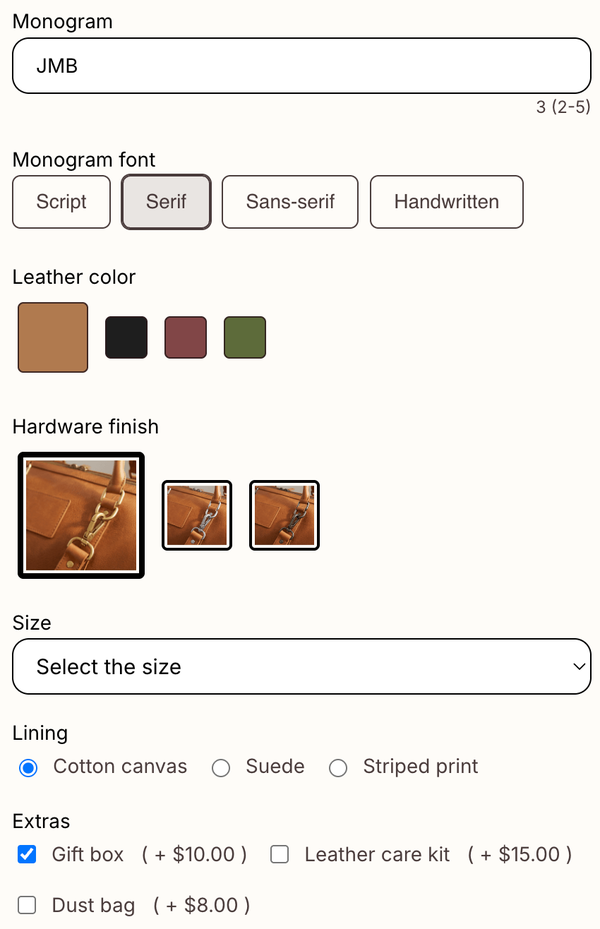
- Add three textbox fields labeled “First name initial”, “Middle initial” and “Last name initial”. Label them by name, never by position (“left letter”), because customers do not know your layout.
- Set each field’s character limit to 1 and make the first and last required. Leave the middle optional for customers without one. A one-letter limit stops “Jane” ending up in the first-initial box.
- Turn on uppercase transformation so “j” is saved as “J”, and add a tooltip: “We arrange your initials in classic monogram order for you.”
- Add a font selector and a color swatch for the lettering style and thread color. Our guides to the Shopify font picker and the color swatch field cover both.
- Place a test order and open it in Shopify admin to confirm all three letters, the font and the color appear under the product.
The field setup in one view:
| Field | Type | Setting |
|---|---|---|
| First name initial | Textbox | Max 1, required, uppercase |
| Middle initial | Textbox | Max 1, optional, uppercase |
| Last name initial | Textbox | Max 1, required, uppercase |
| Monogram font | Font selector | 3 to 4 fonts you can stitch |
| Thread color | Color swatch | Only colors you stock |
If you only sell block monograms and want a live preview on the product image, one textbox works too: set a minimum of 2 and a maximum of 3 characters and link it to the font selector, so the shopper sees their letters in the chosen font before adding to cart.
For anything with engraved text rather than stitched letters, our Shopify engraving personalization guide covers line limits and engraving fees.
What does the maker receive on the order?
Every value is saved on the order as a line item property, listed under the product it belongs to. With the three-field setup, a towel order reads like this in Shopify admin and the order email:
- First name initial: J
- Middle initial: M
- Last name initial: B
- Monogram font: Serif
- Thread color: Navy
Your workshop now knows the last name is B, so a traditional monogram is stitched J B M with B larger, and no one emails the customer to ask.
To print the letters on a packing slip for the workshop, add the line item properties to your template; Shopify’s packing slip help page explains the template, and our packing slip guide shows the edit.
“I needed the customization to avoid having to engage every single customer on every single order. This allowed the customer to choose and have it documented on the order itself.”
Kool Kups, United States, January 11, 2024 (Shopify App Store review)
How do you charge for monogramming?
Add an “Add monogram” checkbox with an add-on price, and show the letter fields only when it is ticked. The fee appears in the cart as its own line item. Add-on charges are on the Premium plan ($9.99 a month or $95.90 a year, as of November 2026); our product add-ons guide walks through it.
A concrete scenario: say you sell 300 towels a month, 40% of buyers add a $8 monogram, and before this setup 1 in 20 monogram orders needed an email to confirm the letter order. That is $960 a month in visible monogram fees and about 6 fewer customer emails a month, each one an order that waited.
Who this Shopify monogram app setup is for, and who it is not
This setup fits stores that stitch, engrave or print the monogram themselves and need clean, unambiguous initials on every order.
- Good fit: towels, robes, totes, leather goods, napkins, pouches, stationery.
- Good fit: stores that want the monogram fee visible and the letter fields hidden until a shopper opts in.
- Not a fit: stores whose shoppers must see the finished classic layout (larger center letter, interlocking or circle frame) drawn on the product. A full product designer app with monogram text effects handles that.
- Not a fit: stores that want someone else to make and ship the personalized product.
My honest take: the caveat I would want to know first is that Mini:Custom Fields Personalize collects the letters, font and color but does not draw a classic monogram. Its live preview shows the text as typed in the chosen font, so it previews a block monogram well and a traditional one not at all.
The second caveat is the fee: because it is a separate cart line, a customer can remove it and keep the monogrammed item, so check orders for the fee before stitching. For most monogram stores, getting the letters right on the order matters more than a drawn preview, which is why I would set up fields before paying $24.99 a month for a Shopify monogram app sold as a monogram-only tool. For the full field setup, see our guide to adding custom fields to product pages.
FAQ
What is the best Shopify monogram app?
It depends on who makes the product. If you stitch or engrave it yourself, a custom fields app such as Mini:Custom Fields Personalize collects the initials, font and color from $5.99 a month. If shoppers must see a drawn classic monogram, look at a product designer app with monogram text effects.
How do I add a monogram option to a Shopify product?
Install a custom fields app, add three one-letter textbox fields labeled first, middle and last initial, add a font and color choice, and place a test order. The initials are then saved on each order under the product.
What order do the letters go in a three-letter monogram?
For one person, a traditional monogram is first initial, last-name initial (larger, in the center), then middle initial. A block monogram with same-size letters reads first, middle, last. Ask customers for initials by name and arrange them yourself.
Can customers preview their monogram before buying?
Yes, as text in the chosen font. Mini:Custom Fields Personalize shows live preview for textbox fields on the product image, so the shopper sees their letters in the font they picked before adding to cart. This suits block monograms best, because the preview shows the letters as typed.
How do I charge extra for monogramming on Shopify?
Attach an add-on price to an “Add monogram” checkbox and show the letter fields only when it is ticked. In Mini:Custom Fields Personalize this is on the Premium plan at $9.99 a month, and the fee appears as its own cart line.
Can I make monogram letters capitals only?
Yes. Turn on uppercase transformation on each textbox, so a lowercase “j” is shown and saved as “J”. Combine it with a 1-character limit per field.
Where do I find the monogram on the order?
Each letter, the font and the color are saved as line item properties under the product in Shopify admin and in the order confirmation email. Add them to your packing slip template if your workshop works from printed slips.