
A Qstomizer alternative makes sense when you pay for a full visual designer but your customers only type a name or upload a photo. Qstomizer starts at $9.99/month for 25 customizable products and has no free plan; Mini:Custom Fields Personalize (4.9 from 143 reviews, Built for Shopify) covers text, options and uploads for $9.99/month without pricing by product count, and Mini: File Upload Image Upload handles multi-photo uploads from $7.90/month. Stores whose customers design on a drag-and-drop canvas with 3D preview need Qstomizer’s Advanced plan ($29.99/month) or higher.
Disclosure: we build Mini:Custom Fields Personalize and Mini: File Upload Image Upload, the two apps this post compares with Qstomizer, so the setup notes below come from building them, not from a spec sheet.
Last updated November 2026.
In this post
- Qstomizer alternative compared
- Which app fits which personalization job?
- What Qstomizer offers
- What Mini:Custom Fields Personalize does instead
- Customers need to upload several photos: what works?
- How to choose
- Our honest take
- FAQ
Qstomizer alternative compared
Here are the three apps side by side on rating, reviews and paid pricing.
| App | Rating | Reviews | Pricing | Best for |
|---|---|---|---|---|
| Qstomizer – Product Customizer | 4.7 | 120 | $9.99 to $49.99/mo | Visual designer, print areas, 3D |
| Mini:Custom Fields Personalize | 4.9 | 143 | $5.99 or $9.99/mo | Text, options, uploads, add-on fees |
| Mini: File Upload Image Upload | 5.0 | 30 | $7.90/mo | Photo uploads with crop and preview |
Ratings, reviews and prices from each app’s Shopify App Store listing, as of November 2026.
Both of our apps carry the Built for Shopify badge, Shopify’s review of speed, design and integration quality; Qstomizer’s listing does not show it. Mini:Custom Fields Personalize also leads on rating (4.9 vs 4.7) and review count (143 vs 120).
Which app fits which personalization job?
Most stores do one of four jobs, and only one of them needs a full designer. Match the job first, then the app.
| What your customer does | What you need | App that fits |
|---|---|---|
| Types a name, date or message | Text field with live preview | Mini:Custom Fields Personalize |
| Picks options and pays extra | Dropdowns, swatches, add-on charge | Mini:Custom Fields Personalize |
| Uploads one or several photos | Upload field with file count limits | Mini: File Upload Image Upload |
| Designs a print area with clipart and layers | Drag-and-drop canvas | Qstomizer |
We see this split in our own App Store data. In the 90 days to November 10, 2026, merchants who searched “product customizer” in the Shopify App Store opened Mini:Custom Fields Personalize 24 times and installed it 4 times. They were looking for a customizer, and a set of fields was what they needed.
What does Qstomizer offer?
Qstomizer – Product Customizer, by Big Van Studio, has been on the Shopify App Store since August 2014 and is rated 4.7 from 120 reviews. It is a visual product designer: customers place text, images and stock art on print areas, across several sides of a product, with a live 3D preview on higher plans.
Its plans are priced by the number of customizable products, with a 15-day free trial on each.
| Qstomizer plan | Price | Customizable products | Image storage |
|---|---|---|---|
| Basic | $9.99/mo | 25 | 25 GB |
| Grow | $16.99/mo | 30 | 50 GB |
| Advanced | $29.99/mo | 50 | 100 GB |
| Professional | $49.99/mo | Unlimited | Unlimited |
Source: Qstomizer’s Shopify App Store listing, as of November 2026.
The listing also includes 15,000+ stock images and QR codes, 200+ templates, AI text-to-image, background removal and uploads in PDF, PSD, AI, EPS and CDR.
What does a Qstomizer alternative like Mini:Custom Fields Personalize do?
Mini:Custom Fields Personalize adds input fields to the product page instead of a design canvas. The customer fills them in, and every answer is saved on the order line.
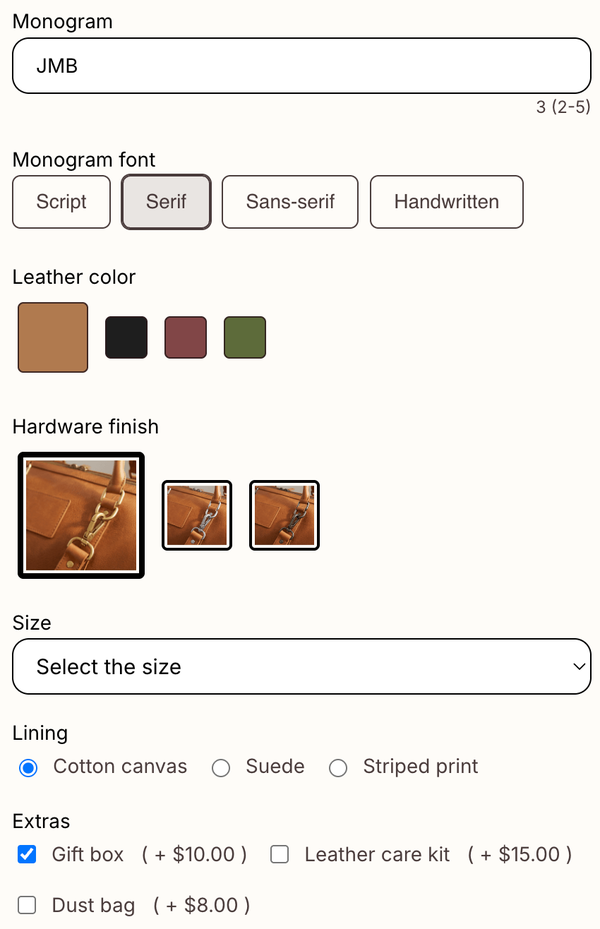
- Field types: textbox, dropdown, radio, checkbox, date picker, file upload, image swatch, font selector, color swatch and number input.
- Live preview: text typed into a textbox and images in an upload field show on the product image before add to cart.
- Add-on charges (Premium): charge for engraving or a photo print as a separate line item in the cart.
- Conditional logic (Basic and up): show the engraving box only when the shopper ticks “Add engraving”.
- Plans: Basic $5.99/month for unlimited fields; Premium $9.99/month adds upload fields, image swatches and add-on charges.
We build Shopify apps for a living, so the line we draw is simple: if what the customer gives you fits in a field, a field is quicker to fill in than a canvas. For how the preview looks in practice, see our post on product preview personalization.
Say you sell 40 personalized products, from mugs to keyrings, and each needs a name and a photo. On Qstomizer, 40 products is past the 25-product Basic plan and the 30-product Grow plan, so you are on Advanced at $29.99/month. On Mini:Custom Fields Personalize Premium the same setup is $9.99/month, because its plans are not priced by product count. That $20 monthly gap is a good reason to look for a Qstomizer alternative once a catalog passes 25 products.
“This is simple, easy to use app. You can do many variation options.”
Engraving Arts, South Africa, October 1, 2026, Shopify App Store review
Customers need to upload several photos: what is the best Qstomizer alternative?
For a photo collage, a photo book or a multi-pet portrait, the best Qstomizer alternative is an upload field that accepts several files at once. A shopper picking 6 photos from a phone does not need a canvas; they need one tap to add all 6.
This is a real question we see in Search Console: “what is a good replacement for qstomizer if customers need to upload several images for a photo collage?” showed our site in Google in the last 90 days. The answer is Mini: File Upload Image Upload, where you set a minimum and maximum file count on the upload field, restrict file types and let customers crop each photo to a square or circle before checkout.
- Install Mini: File Upload Image Upload and create an upload field.
- Pick the collage products under Visibility.
- Under Rules & Settings, turn on File Count Limits and set, for example, 4 to 9 files.
- Restrict file types to JPEG and PNG and set a maximum file size.
- Turn on the image editor if each photo needs a square crop.
- Add a test order and check the file links in the order details.
Every file arrives in the Shopify order details as a link, so you can download the set and build the collage yourself. Our roundup of the best Shopify image upload apps compares more upload options.
How to choose
Use these checks to decide whether you need a Qstomizer alternative at all.
- Customers design on a canvas with layers, clipart or several print sides: stay on Qstomizer.
- You need 3D preview or a stock image library: Qstomizer, with 3D on Grow (1 product) and full 3D from Advanced.
- Customers type text and pick options: Mini:Custom Fields Personalize, from $5.99/month.
- Customers upload one or several photos: Mini: File Upload Image Upload, $7.90/month on Premium.
- You have more than 25 customizable products: compare Qstomizer’s $29.99 and $49.99 plans with apps that do not price by product count.
For a wider look at designer-style apps, see our list of the best Shopify product customizer apps.
Our honest take
I think many stores that install a full product designer use a fraction of it, and pay for the rest with a busier product page. For a name necklace, I would rather hand the shopper a text box than a canvas. The caveat is real, though: our apps do not do drag-and-drop layouts, clipart, multi-side print areas or 3D. And our live preview covers textbox and upload fields, not dropdowns or swatches. If your product is the design itself, you need a canvas designer, not fields.
FAQ
What is the best Qstomizer alternative for Shopify?
It depends on the job. For text, options and add-on charges, Mini:Custom Fields Personalize at $5.99 or $9.99/month. For photo uploads, including several photos per order, Mini: File Upload Image Upload at $7.90/month. For a full canvas designer, stay on Qstomizer.
How much does Qstomizer cost?
Qstomizer’s plans are $9.99 (25 products), $16.99 (30), $29.99 (50) and $49.99 per month (unlimited), with a 15-day free trial and no free plan, according to its App Store listing as of November 2026.
Does Qstomizer have a free plan?
No. Every Qstomizer plan is paid, with a 15-day free trial. Mini:Custom Fields Personalize has a free plan with 1 field, and Mini: File Upload Image Upload has a free plan for 1 product page.
Can customers upload multiple photos without Qstomizer?
Yes. In Mini: File Upload Image Upload you set a minimum and maximum number of files on the upload field, so a shopper can add several photos for a collage in one step.
Can I show a live preview without a product designer app?
Yes, for text and uploads. Mini:Custom Fields Personalize shows typed text and uploaded images on the product image before add to cart. It does not preview dropdown or swatch choices.
Can I charge extra for personalization without Qstomizer?
Yes. Mini:Custom Fields Personalize Premium adds the charge as a separate cart line item. One limit to know: a customer can remove that line in the cart while keeping the product.
Will my orders keep the design files if I uninstall Qstomizer?
Download any files you still need from open orders first. Files are hosted by the app that collected them, so do not count on links working after you remove it.