
Bold Product Options is now called SC Product Options, run by Shop Circle, rated 4.6 from 1,254 reviews, with paid plans at $14.99 and $39.99 a month. The Bold Product Options alternative we build, Mini:Custom Fields Personalize (4.9 from 145 reviews, Built for Shopify), puts conditional logic on its $5.99/month Basic plan and paid add-ons, file uploads and image swatches on its $9.99/month Premium plan. SC Product Options is the better pick if shoppers must edit their options on the cart page; ours is the better pick if you want those four features for $30 a month less.
Disclosure: we build Mini:Custom Fields Personalize, so read this as a maker’s comparison. Every SC Product Options fact below comes from its Shopify App Store listing, as of November 2026.
Last updated November 2026
In this post:
- Bold Product Options alternative at a glance
- What happened to Bold Product Options?
- Which plan do you need for each feature?
- What does the price gap look like for a real store?
- When do you need SC Product Options instead?
- How to switch from SC Product Options
- How to choose a Bold Product Options alternative
- Our honest take
- FAQ
Bold Product Options alternative at a glance
A Bold Product Options alternative is any Shopify app that adds custom fields, extra options and paid add-ons to a product page without creating new variants. Here are the two apps side by side on paid plans only:
| App | Rating | Reviews | Paid plans | Best for |
|---|---|---|---|---|
| Mini:Custom Fields Personalize (us) | 4.9 | 145 | Basic $5.99/mo, Premium $9.99/mo | Personalization fields, logic and add-ons on a small budget |
| SC Product Options (formerly Bold) | 4.6 | 1,254 | Basic $14.99/mo, Premium $39.99/mo | Stores that need option editing on the cart page |
Ratings, reviews and prices from each app’s Shopify App Store listing, as of November 2026.
We build Shopify apps for a living, so we know which fields a personalized product actually needs before checkout, and which ones merchants pay for and never switch on. For a wider view of the category, see our best Shopify product customizer apps roundup.
What happened to Bold Product Options?
Bold Product Options did not shut down: it was renamed. Shop Circle announced in November 2023 that “SC Product Options” is the app “previously known as Bold Product Options” (Shop Circle’s announcement). The App Store listing is still at the same address, apps.shopify.com/product-options.
That is why so many searches for the Bold Product Options Shopify app land on old directory pages with old prices. Merchants still type the old name: in the last 90 days, searches like “bold custom fields” and “bold: custom fields” brought merchants to our own App Store listing, three years after the rename. If your theme or your agency’s notes say “Bold”, they mean the app now called SC Product Options.
Which plan do you need for each feature?
The real difference between the two apps is which plan unlocks which feature. SC Product Options keeps conditional logic, paid add-ons and swatches on Premium at $39.99/month; Mini:Custom Fields Personalize has conditional logic on Basic and the rest on Premium at $9.99/month. This is the table we could not find anywhere else:
| Feature | SC Product Options | Mini:Custom Fields Personalize |
|---|---|---|
| Unlimited fields or options | Basic, $14.99/mo | Basic, $5.99/mo |
| Conditional logic (show/hide) | Premium, $39.99/mo | Basic, $5.99/mo |
| File and image upload | Basic, $14.99/mo | Premium, $9.99/mo |
| Image swatches | Premium, $39.99/mo | Premium, $9.99/mo |
| Charge for add-ons | Premium, $39.99/mo | Premium, $9.99/mo |
| Edit options on the cart page | Premium, $39.99/mo | Not offered |
Plan contents from each app’s Shopify App Store listing, as of November 2026. Yearly billing: SC Product Options $149.99 or $399.99; Mini:Custom Fields Personalize $47.90 or $95.90.
Why does the plan matter more than the headline price? Because almost every personalized product uses at least one Premium-only feature on SC Product Options. A “Gift wrap (+$5)” checkbox is a paid add-on. A text box that only appears after a shopper ticks “Add engraving” is conditional logic. Either one moves you to $39.99. On our side, the same show/hide setup works on Basic, as our Shopify conditional logic guide walks through.
Swatches follow the same pattern: SC Product Options puts image and color swatches on its $39.99 Premium plan, and our image swatch field comes with Premium at $9.99. Here is a Thread color swatch field from our demo store, the kind of field a monogram or embroidery store puts next to the name box:
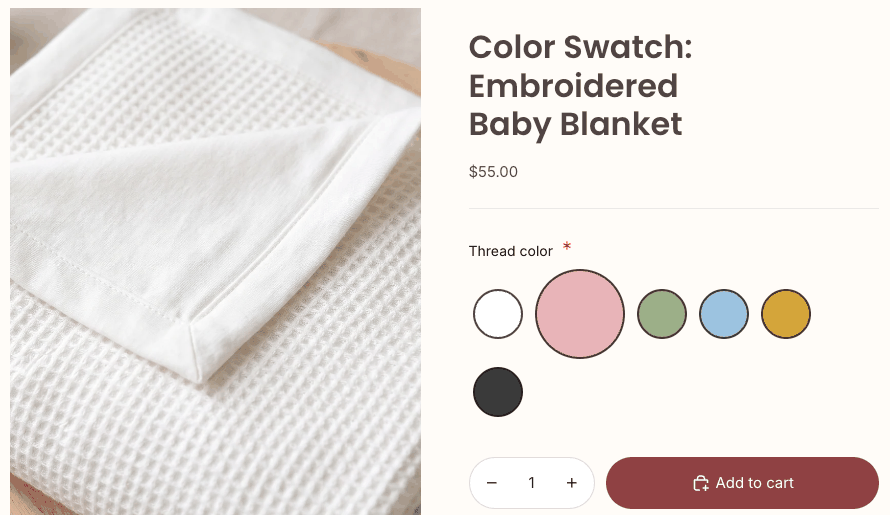
Our color swatch custom field guide shows how that field is built, step by step.
What does the price gap look like for a real store?
For a typical personalization setup, a Bold Product Options alternative at $9.99 saves $30 a month, or about $304 a year on annual billing. Say you sell engraved cutting boards: a checkbox “Add engraving (+$8)” reveals a text box, and a file upload takes the customer’s logo. That setup needs a paid add-on, conditional logic and uploads. On Mini:Custom Fields Personalize, the engraving text and the uploaded logo can also show as a live preview on the product image, so the customer checks the result before paying.
| What your product needs | SC Product Options, per year | Mini:Custom Fields Personalize, per year |
|---|---|---|
| Engraving add-on, show/hide text box, logo upload | $399.99 (Premium) | $95.90 (Premium) |
| Show/hide fields only, no charges | $399.99 (Premium) | $47.90 (Basic) |
| File upload only, no logic, no charges | $149.99 (Basic) | $95.90 (Premium) |
Annual plan prices from each app’s Shopify App Store listing, as of November 2026.
On monthly billing, the cutting board setup costs $479.88 a year on SC Product Options and $119.88 on ours, a $360 difference. If that $8 engraving add-on sells 20 times a month, the SC Premium fee eats a quarter of the add-on revenue; on our Premium plan it is about 6%. How the add-on charge reaches the cart is covered in our post on charging for personalization.
When do you need SC Product Options instead?
Before you pick a Bold Product Options alternative, check one feature: whether your shoppers need to change their choices after adding to cart. SC Product Options lists “Edit Options On Cart Page” on its $39.99/month Premium plan.
The other differences are plain facts. SC Product Options is rated 4.6 and we are rated 4.9, and only Mini:Custom Fields Personalize carries the Built for Shopify badge, as of November 2026. Its Basic and Premium plans list 24/7 live chat support and a free install and consultation. Its listing also names integrations with EComposer, PageFly, Order Printer and Spently. If your store depends on one of those, check how it behaves with either app on a development store before you switch.
How to switch from SC Product Options to Mini:Custom Fields Personalize
Moving to a Bold Product Options alternative means rebuilding your fields, not importing them: there is no import from SC Product Options, so start with a list. Run both apps side by side until the new fields are tested, so no product goes a day without its options.
- List every option set in SC Product Options and the products it is assigned to.
- Mark which features each set uses: add-on prices, show/hide rules, uploads, swatches. That tells you whether Basic or Premium is enough (see the table above).
- Install Mini:Custom Fields Personalize and rebuild the fields for one product first, with the same labels your staff already read on orders.
- Add that product to the cart on your storefront and check that every answer shows under the product.
- Repeat for the rest of the catalog, then turn off the SC Product Options option sets.
- Uninstall SC Product Options and preview your product pages to make sure no old option blocks remain in the theme.
Step 4 is the one that catches mistakes. This is what a saved choice looks like in the cart on our demo store:
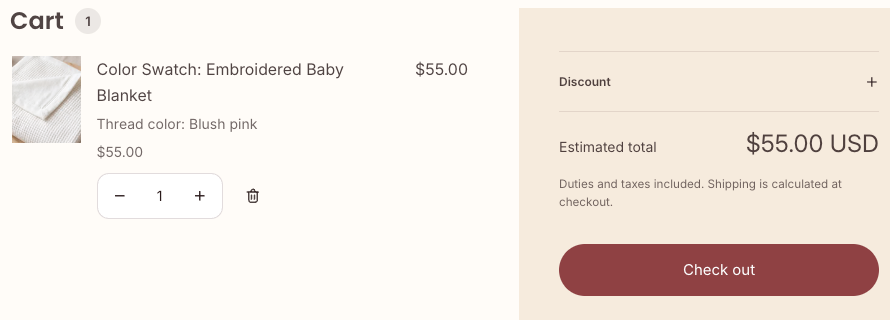
Your past orders keep the option answers already saved on them. Shopify stores those answers on the order’s line items, so removing the app does not erase them. Shopify’s own guide to product variants is worth a read if you are deciding which choices should be real variants (with their own inventory) and which should stay as custom fields.
How to choose a Bold Product Options alternative
Pick a Bold Product Options alternative by the features your products use, not by review count. Run through this list:
- Shoppers must edit options in the cart: stay on SC Product Options Premium.
- You need show/hide fields but no extra charges: Mini:Custom Fields Personalize Basic, $5.99/month.
- You charge for engraving, gift wrap or rush handling: Mini:Custom Fields Personalize Premium, $9.99/month.
- You need uploads plus swatches plus add-ons: Mini:Custom Fields Personalize Premium covers all three for $9.99/month.
- You want 24/7 live chat on the plan page: SC Product Options lists it on both paid plans.
If you are also comparing other option apps, our Easify alternative comparison uses the same plan-by-plan method.
“This app has made it so easy for me and my customers. It’s easy to use and extremely helpful.”
June Bugz, United States, November 10, 2026 (Shopify App Store review)
Our honest take
I think show/hide logic is a basic feature for a personalization app, not a premium one. Most stores use it to hide one engraving box behind a checkbox, and $39.99 a month is the wrong price for that. That is the main reason we call ourselves a Bold Product Options alternative: the features merchants use every day sit on plans that cost $5.99 and $9.99.
Our caveats are real. We have no cart-page editing. Our add-on charge goes into the cart as its own line item, so a customer can remove that add-on line and keep the product; check orders with add-ons before you ship. And we have 145 reviews against 1,254, so you are trusting a smaller track record.
FAQ
What happened to Bold Product Options?
Bold Product Options was renamed SC Product Options. Shop Circle runs it and announced the new name in November 2023. The App Store listing stays at apps.shopify.com/product-options, so installed stores kept the same app.
Is SC Product Options the same app as Bold Product Options?
Yes. Shop Circle describes SC Product Options as the app previously known as Bold Product Options. If a guide, theme note or agency checklist mentions Bold Product Options, it refers to SC Product Options today.
How much does SC Product Options cost in 2026?
Basic is $14.99/month or $149.99/year, and Premium is $39.99/month or $399.99/year, according to its App Store listing in November 2026. Conditional logic, paid add-ons, swatches and cart-page editing are on Premium.
What is the cheapest Bold Product Options alternative with conditional logic?
Mini:Custom Fields Personalize includes conditional logic on its Basic plan at $5.99/month or $47.90/year. On SC Product Options, conditional logic needs the $39.99/month Premium plan.
Can I charge extra for a product option without SC Product Options Premium?
Yes. Mini:Custom Fields Personalize Premium, $9.99/month, adds a price to an option (such as engraving for $8) and puts that charge in the cart as a separate line item. A customer can remove that line, so check orders with add-ons before fulfilling.
Will I lose old order details if I uninstall Bold Product Options?
No. The option answers on past orders are saved on the orders themselves, so they stay after you uninstall. New orders only carry answers from the app that is installed when the customer buys.
Can customers edit their options in the cart with Mini:Custom Fields Personalize?
No. To change an answer, the customer removes the item and adds it again from the product page. If cart-page editing is a must for your store, SC Product Options Premium lists it.