

Managing personalized orders shopify stores collect through custom fields is simpler than it looks: every value a customer enters, textbox, dropdown, checkbox, or datepicker, lands automatically on the order as a line item property. It’s visible in Shopify Admin under the order’s line items, prints on packing slips, and comes through in a standard order export. There’s no separate dashboard to check; the personalization data is already inside the order Shopify gives you.
In this post:
- Where personalized order details actually live in Shopify
- How to view custom field values on an order
- Getting gift notes and custom text onto packing slips
- Exporting personalized order data in bulk
- Setting up a workflow so an order doesn’t get missed
- Common mistakes that cause lost track of orders
- FAQ
Disclosure: we build Mini:Custom Fields Personalize, the app whose field data is described here, and the line item property behavior itself is standard Shopify platform behavior, not something proprietary to the app.
Where Personalized Order Details Actually Live in Shopify
Say a customer orders a personalized cutting board and types “Happy 10th Anniversary, Mark & Sara” into a gift message textbox before checkout. That text doesn’t go anywhere special, it saves as a line item property attached to that specific product in the order, the exact same mechanism Shopify uses internally for its own variant and note data. Managing personalized orders shopify merchants deal with day to day is really just knowing where Shopify already put that information.
Why does this surprise so many merchants? Because it feels like personalization data should need its own system. It doesn’t. Custom field values are order data from the moment checkout completes, not a separate layer bolted on top. If you haven’t set up the fields themselves yet, our guide to adding custom fields to product pages covers that first step.
How to View Custom Field Values on an Order in Shopify Admin
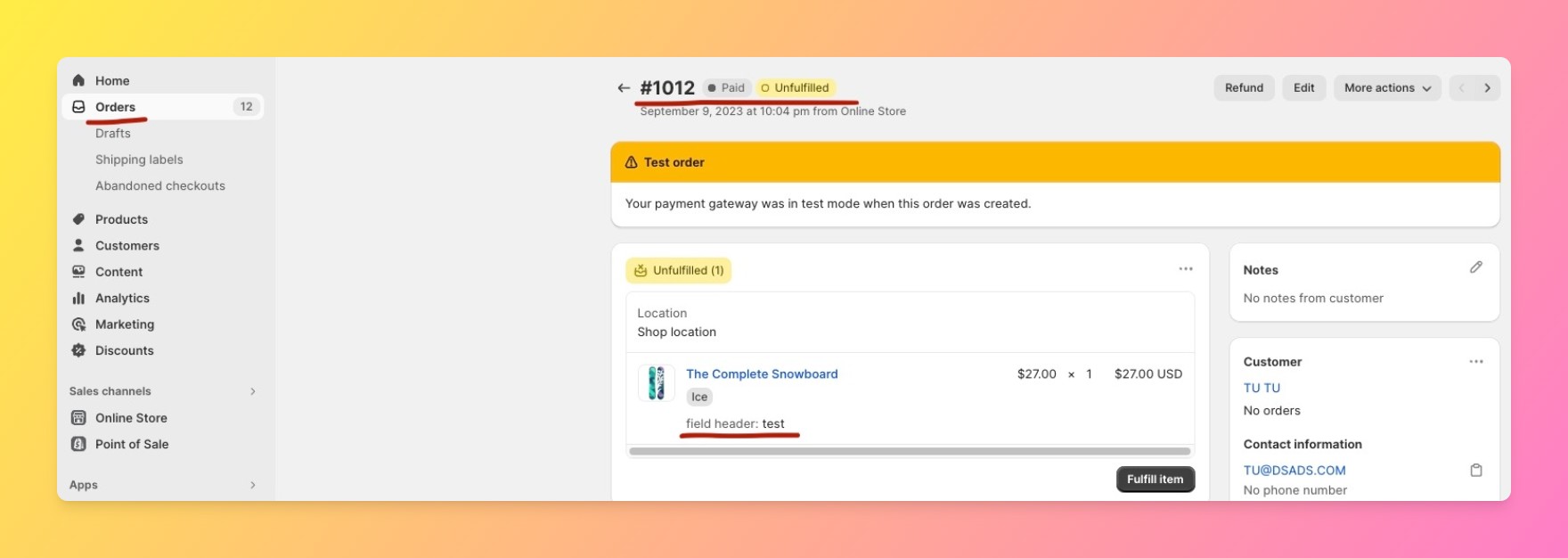
Open Shopify Admin, go to Orders, and click into the order in question. Scroll to the line items section: each product shows its variant details first, then any custom field values directly underneath, labeled with the field’s name. A “Gift Message” textbox entry shows up as “Gift Message: Happy 10th Anniversary, Mark & Sara” right below the product line, no extra click required.
“Simple and intuitive application that makes the user experience easier. The support service is fast and resolves issues quickly. I recommend the product!”
Source: Lencon Incisioni, Italy (Shopify App Store review, translated from Italian)
Getting Gift Notes and Custom Text onto Packing Slips
Because custom field values are line item properties, they’re available to any packing slip template the same way native order data is, no separate integration needed. Our full guide to customizing a packing slip on Shopify covers formatting these values into a template so a warehouse team sees the gift note without opening the order in Admin first.
One caveat worth stating plainly: if your packing slip template was built before you added custom fields to a product, it won’t automatically show new field values, someone has to add them to the template. This is a one-time setup step, not something that happens on its own.
Exporting Personalized Order Data in Bulk
Shopify’s standard order export (Orders → Export) includes line item properties in the CSV output, so custom field values come along with every other order field, no separate export tool required. This matters most around high-volume periods, if you’re batching 200 personalized orders for a production run, the export gives you every gift message and option choice in one spreadsheet instead of opening each order individually. Shopify’s own order export documentation covers the exact CSV columns included.
Setting Up a Workflow So a Personalized Order Doesn’t Get Missed
The most common way a personalized order gets missed isn’t a technical failure, it’s a fulfillment team scanning order line items visually and skimming past a custom field row. A few things reduce that risk: tag orders with personalization automatically using Shopify Flow (available on Shopify plans that support it), keep custom field labels short and consistent so they’re easy to scan, and export daily during high-volume periods rather than relying on manual review of each order in Admin.
The honest gripe here: Mini:Custom Fields Personalize doesn’t include its own order-tagging or alerting feature, that part depends on Shopify Flow or a merchant’s own fulfillment process. We don’t try to own the whole post-purchase workflow, just the data capture on the product page.
Put together, that’s the full picture of managing personalized orders shopify stores need: capture the data on the product page, let Shopify’s own order tools surface it, and add a lightweight tagging or export habit on top so nothing depends on someone remembering to scroll down on every order.
Managing Personalized Orders Shopify Merchants Ship: Common Mistakes
Most of the “we missed a gift message” support tickets we see trace back to one of the same four habits, not a platform limitation:
- Packing slip template not updated after adding a new field. The data is in the order, but it never reaches the printed slip.
- Assuming personalization data needs a separate app to view. It’s already in Shopify Admin and the standard order export, no extra tool required.
The same line-item-property mechanism also carries add-on pricing surcharges, so if you’re charging extra for personalization, see our guide on how to charge extra for personalization on Shopify for how that line item shows up on the order.
Frequently Asked Questions
- 1. Where do custom field answers show up after a customer places an order?
- They save as line item properties and appear directly under the relevant product in the order’s line items section in Shopify Admin, plus on packing slips and in order exports.
- 2. Do I need a separate app to see personalized order details?
- No. Managing personalized orders shopify merchants deal with doesn’t require a separate dashboard, the data lives in the standard order view and export Shopify already provides.
- 3. Can I export personalized order data in bulk?
- Yes. Shopify’s standard order export includes line item properties in the CSV, so custom field values come through alongside every other order field.
- 4. Will a customer’s gift message print on the packing slip automatically?
- Only if your packing slip template already references that field. If the field was added after the template was built, someone needs to update the template once.
- 5. How do I avoid missing a personalized order during a busy sales period?
- Tag personalized orders automatically with Shopify Flow if your plan supports it, and export order data daily rather than relying on visually scanning each order in Admin.
- 6. What are Shopify line item properties?
- They’re custom data attached to a specific product within an order, the same mechanism Shopify uses for its own native order details, and the mechanism custom field apps like Mini:Custom Fields Personalize write to.



