

A shopify pre-launch product page combines three things: a launch-date badge, a hidden or disabled buy button, and a signup form that collects interest before the product exists in stock. Restock Alert & Waitlist ‑ Mini handles all three with the same waitlist mechanic it uses for back-in-stock alerts, and signups carry zero commitment on your side, no prepayment or deposit is collected when someone joins the list.
In this post:
- What is a pre-launch product page?
- The 3 building blocks: badge, hidden buy button, signup form
- Setting up a pre-launch page in Restock Alert & Waitlist ‑ Mini
- Using signups to gauge demand before you commit to inventory
- Pre-launch vs. coming soon vs. waitlist: which term fits
- Common mistakes that kill pre-launch conversions
- FAQ
Disclosure: we build Restock Alert & Waitlist ‑ Mini and the signup mechanic that powers every shopify pre-launch product page we help merchants set up, so what follows comes from configuring these pages directly, not a general product description.
What Is a Shopify Pre-Launch Product Page?
Why does this get confused with a restock alert so often? Because both use a signup form and both notify customers by email later, but the underlying situation is completely different. A restock alert applies to a product that already existed and sold out. A shopify pre-launch product page applies to a product that hasn’t gone on sale yet at all, there’s no inventory, no price commitment, nothing to buy, just a page that says here’s what’s coming and asks if you’re interested.
Say you’re launching a new colorway of an existing product in six weeks. You already have the photos and the product page copy ready, but the item won’t be in stock until the launch date. A pre-launch page lets you publish that page today, show it’s coming, and start collecting names instead of leaving the product invisible until the exact day it ships.
The 3 Building Blocks of a Shopify Pre-Launch Product Page
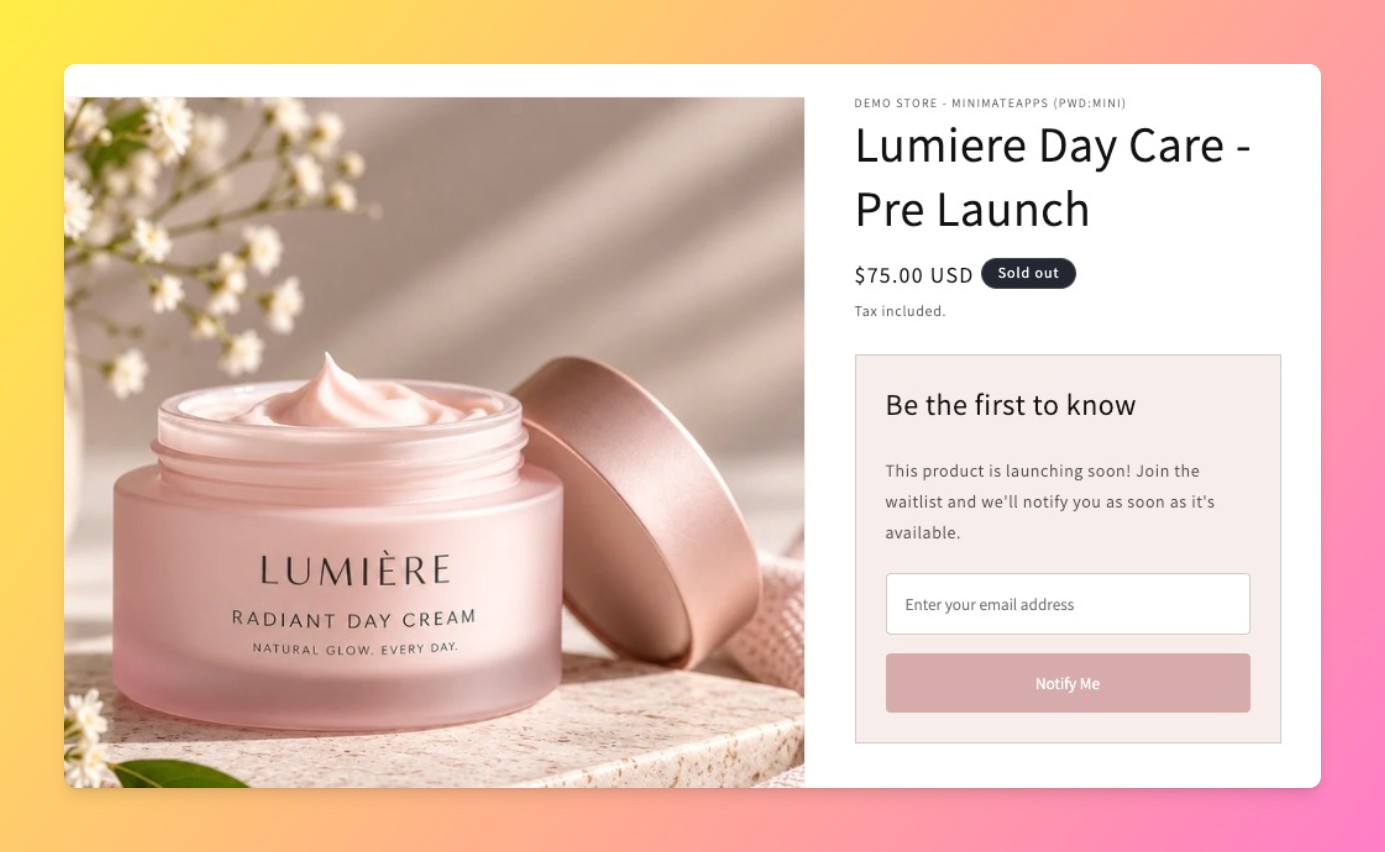
1. A launch-date badge. A short label near the price, “Launching [date]” or simply “Coming Soon,” tells the shopper this is a real, dated plan, not a permanently unavailable item.
2. A hidden or disabled buy button. The product page stays visible and browsable, but the add-to-cart button is swapped out so nobody can accidentally purchase something that doesn’t exist yet.
3. A signup form in the buy button’s place. This is where Restock Alert & Waitlist ‑ Mini does the actual work, capturing an email so you can notify that customer automatically the moment the product goes live.
Setting Up a Shopify Pre-Launch Product Page With Restock Alert & Waitlist ‑ Mini
Install the app and mark the product as coming soon rather than out of stock, the distinction matters because it changes the copy and badge the app shows automatically. Customize the signup form’s headline to reference the launch, something like “Be first to know when this drops,” rather than reusing generic back-in-stock language written for a sold-out product. For the storewide version of “coming soon,” where the entire site isn’t open yet, that’s a separate Shopify setting, not something this app configures, see our guide to creating a waitlist on Shopify for the general setup this builds on.
When the product is ready, flip its inventory and availability on as normal. Anyone who signed up gets notified automatically, the same restock-alert mechanism that fires for a sold-out product fires here too, for a product going live for the first time instead of coming back into stock.
Using Signups to Gauge Demand Before You Commit to Inventory
One honest limit worth stating: a signup is not a sale, and treating a big signup list as a guaranteed order count is a mistake we’ve seen merchants make. What a signup list is good for is a demand signal ahead of a real inventory decision.
Ordering 50 units instead of 200 because only 40 people signed up for a shopify pre-launch product page is a far better call than guessing blind. There’s no prepayment, deposit, or purchase commitment collected at signup, which keeps the friction low enough that you get an honest read on interest rather than a filtered one.
Pre-Launch vs. Coming Soon vs. Waitlist: Which Term Fits Your Situation
| Your Situation | What It’s Called | What to Set Up |
|---|---|---|
| A brand-new product that hasn’t sold before | Pre-launch / coming soon | Launch badge + hidden buy button + signup form |
| An existing product that sold out | Restock / back-in-stock | Sold-out badge + notify-me signup form |
| Your whole storefront isn’t open yet | Coming soon (storewide) | Shopify’s own password page, not a per-product setup |
A shopify pre-launch product page is scoped to one product. If your entire store isn’t open yet, that’s a different, storewide setting, covered in Shopify’s own password page documentation, not something a waitlist app configures.
Common Mistakes That Kill Pre-Launch Conversions
- Reusing sold-out copy. “Notify me when back in stock” reads oddly on a product that was never in stock to begin with, write launch-specific copy instead.
- No launch date at all. A page that just says “coming soon” with no timeframe reads as vague and gets fewer signups than one with even an approximate date.
- Leaving the buy button active. If checkout isn’t actually blocked, some themes let a shopper “purchase” an item with zero inventory, creating an order you can’t fulfill.
“The plugin is easy to install and incredibly user-friendly. It offers all the features I need for a coming-soon banner. It optimizes the Shopify store and the customer experience. Support is very fast and helpful, absolutely recommended!”
Source: HoundHikers, Switzerland (Shopify App Store review, translated from German)
Frequently Asked Questions
- 1. What’s the difference between a pre-launch page and a “coming soon” page?
- They’re often the same thing at the product level. “Coming soon” more commonly refers to a storewide password page blocking the whole site, while a pre-launch page is scoped to one product that will go live for purchase later.
- 2. Can customers pay or reserve a spot before a product launches?
- Not through a shopify pre-launch product page built this way. Signups are free and carry no prepayment or deposit, they’re a notify-me list, not a reservation system.
- 3. How do I hide the buy button but still show the product on Shopify?
- Restock Alert & Waitlist ‑ Mini swaps the buy button for a signup form automatically when a product is marked coming soon, the page itself stays visible and browsable.
- 4. Do I need to set a launch date, or can I just say “coming soon”?
- A date isn’t required, but pages with even an approximate launch date convert better than pages with no timeframe at all, since shoppers are more willing to leave an email for something dated.
- 5. Will people who sign up for a pre-launch product be notified automatically when it’s live?
- Yes. The same automatic notification that fires for a restock alert fires here, once you flip the product’s availability on, signups get emailed without any manual step.
- 6. Can I use the same waitlist app for both pre-launch and restock alerts?
- Yes. Restock Alert & Waitlist ‑ Mini uses one signup mechanism for both situations, the only difference is which state you mark the product in and what copy you show.



