The best Zakeke alternative for stores that sell names, monograms, colors and photo uploads is Mini:Custom Fields Personalize: $9.99/month flat on Premium, no fee per sale, Built for Shopify, rated 4.9 from 145 reviews (Zakeke: 4.5 from 98). Zakeke starts at $69.90/month plus 1.9% of every sale made through it, capped at 10 published products. Stay on Zakeke if you need 3D previews or print-ready design files.
Last updated November 2026.
Disclosure: we build Mini:Custom Fields Personalize, the field-based Zakeke alternative in this post, so we priced Zakeke from its public listing and list the jobs a field app cannot do.
In this post:
- Zakeke vs Mini:Custom Fields at a glance
- What Zakeke costs at your sales level
- Designer or fields: which job is yours?
- What does this Zakeke alternative do instead?
- When to stay on Zakeke
- How to switch in 5 steps
- How to choose
- FAQ
Zakeke vs Mini:Custom Fields at a glance
The two apps solve different jobs, so the table compares price model and fit, not just stars:
| App | Rating | Reviews | Paid pricing | Best for |
|---|---|---|---|---|
| Zakeke – Customizer 2D & 3D | 4.5 | 98 | $69.90 to $299.90/mo plus 1.9% to 1.5% per sale | 3D previews, print-ready files, POD |
| Mini:Custom Fields Personalize | 4.9 | 145 | $5.99 Basic or $9.99 Premium/mo, no sales fee | Text, choices, swatches, uploads |
Ratings, reviews and prices from each app’s Shopify App Store listing, as of November 2026. Mini:Custom Fields Personalize carries the Built for Shopify badge; the Zakeke listing does not show it.
What does Zakeke cost at your sales level?
Zakeke charges a monthly plan plus a percentage of each product sold through it: 1.9% on Starter (up to 10 published products), 1.7% on Grow (up to 50) and 1.5% on Scale (up to 100). Here is the monthly total at three levels of customized sales:
| Customized sales per month | Zakeke Starter ($69.90 + 1.9%) | Zakeke Grow ($129.90 + 1.7%) | Mini:Custom Fields Premium |
|---|---|---|---|
| $1,000 | $88.90 | $146.90 | $9.99 |
| $5,000 | $164.90 | $214.90 | $9.99 |
| $10,000 | $259.90 | $299.90 | $9.99 |
Plan prices and fee rates from the Zakeke and Mini:Custom Fields Personalize App Store listings, as of November 2026. Fees are calculated on sales made through Zakeke, before Shopify’s own payment fees.
Say you run a gift shop with 30 personalized products and $5,000 a month in custom orders. You would need Zakeke Grow for the product count, about $2,579 a year on monthly billing, against $95.90 a year for Mini:Custom Fields Premium on annual billing. A Zakeke alternative only makes sense if your products do not need what that money buys, which is the next question.
Designer or fields: which job is yours?
Zakeke is a product designer: the shopper builds a design on a 2D or 3D model, and you receive a print-ready file. Mini:Custom Fields Personalize is a field app: the shopper answers questions on the product page, and you receive the answers on the order line. Match the tool to what you actually produce:
| What you sell | What the shopper does | Better tool |
|---|---|---|
| Engraved jewelry, name signs | Types a name, picks a font | Fields |
| Monogrammed bags, towels | Initials, thread color, placement | Fields |
| Photo gifts, pet portraits | Uploads and crops a photo | Fields |
| Printed shirts with free placement | Drags artwork on a canvas | Designer |
| Sneakers or furniture in 3D | Rotates a model, recolors parts | Designer |
Our own App Store data shows which job most merchants have. In the last 90 days, the App Store searches that brought us the most installs were “textbox” (22 installs, 19 of them through our search ads), “custom fields” (17) and “personalization” (10); “product customizer” brought 4. Most stores searching for personalization want a field, not a design studio.
What does this Zakeke alternative do instead?
Mini:Custom Fields Personalize adds input fields to the product page and saves every answer on the order line. One app covers textbox, dropdown, radio, checkbox, date picker, font selector, color swatch, image swatch, number input and file upload, with conditional logic so a field appears only when an earlier choice needs it. Text fields, dropdowns, date picker and conditional logic start on Basic at $5.99; file upload, image swatch, extra charges and variant rules are on Premium at $9.99.
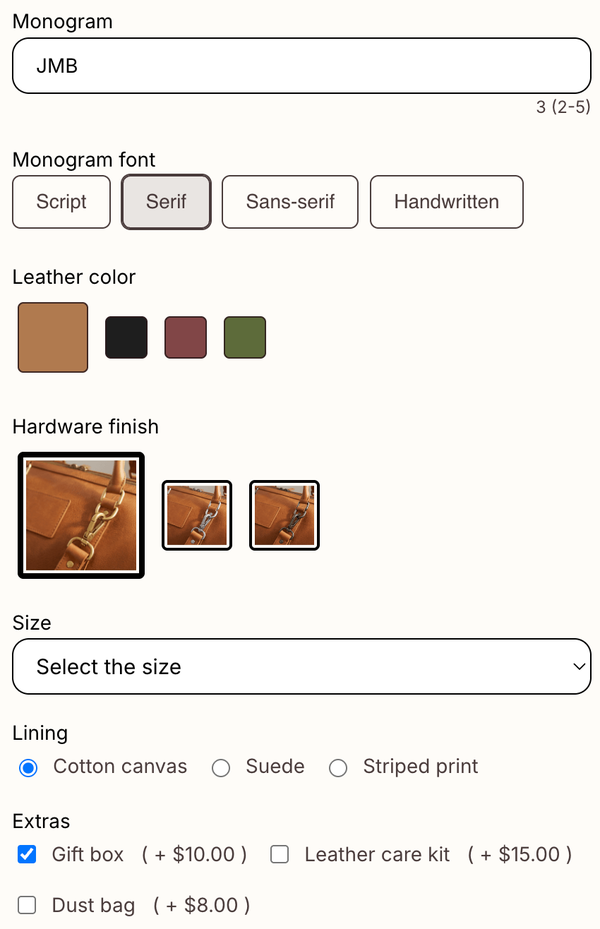
Three things replace the parts of Zakeke most field-based stores used:
- Live preview: textbox and upload fields can show the customer’s text or photo on the product image as they type, which covers the “see it before you buy” moment for names and photos (see our product preview guide).
- Extra charges: on Premium, any choice can add a price, such as $10 for a gift box. The charge is added as a separate cart line item. Our post on charging for personalization shows the setup.
- Variant rules: on Premium, fields can show only on chosen variants, so the engraving box appears on the gold version and not on the gift card.
An engraving shop in South Africa summed up the trade-off in October 2026: “This is simple, easy to use app. You can do many variation options. Perfect for those in the engraving business.” (Engraving Arts, South Africa, 1 October 2026)
When should you stay on Zakeke?
Keep Zakeke if any of these is a hard requirement, because a field app does not do them:
- A 3D model the shopper rotates and recolors part by part.
- Free placement of artwork on a print area, with a print-ready file per order.
- Direct hand-off to a print-on-demand provider.
- AI-rendered previews of embroidery or print effects.
Zakeke’s free plan works only on development stores. One September 2026 review reports a storage cap of 5 GB on a plan the reviewer understood as unlimited, so check storage terms if you keep many design files.
How do you switch from Zakeke in 5 steps?
Moving to a Zakeke alternative is mostly a mapping job: each Zakeke option becomes one field.
- List every product that uses Zakeke and write down each option the shopper sets (text, font, color, image).
- Map each option to a field type: text to textbox, fixed lists to dropdown or swatch, artwork to upload.
- Build the fields in Mini:Custom Fields Personalize and assign them to those products or variants.
- Place a test order and check the answers on the order page and the packing slip.
- Turn Zakeke off for those products only after you have downloaded the print files for open orders.
Shopify’s own guide to product options explains the variant limits you keep either way; custom fields sit on top of variants, not instead of them.
How to choose
- Choose Mini:Custom Fields Personalize if your shopper types, picks or uploads, and you want a flat $9.99 a month on Premium, uploads and extra charges included, whatever your sales.
- Choose Zakeke if your shopper designs on a canvas or a 3D model and you need print-ready output.
- If you are unsure, count last month’s custom orders: if every one could be described in a sentence (“Name: Ava, font: Script, color: gold”), you need fields.
For a wider list of designer and field apps, see our roundup of Shopify product customizer apps and the Kickflip alternative comparison.
Our opinion: a percentage of sales is the wrong price model for a tool that collects a name and a font. It makes your best month your most expensive month for the same software. The caveat about our app, beyond the designer features listed above: live preview covers textbox and upload fields only, and a shopper can remove an add-on charge line from the cart while keeping the product. If your products need a 3D model or a print file, a field-based Zakeke alternative is the wrong fit.
FAQ
What is the best Zakeke alternative for Shopify?
For text, font, color and photo personalization, Mini:Custom Fields Personalize at $9.99/month on Premium with no per-sale fee. For 3D or canvas design, look at other product designer apps, since a field app does not replace that.
How much does Zakeke cost?
Starter is $69.90/month plus 1.9% per sale for up to 10 products, Grow is $129.90 plus 1.7% for up to 50, and Scale is $299.90 plus 1.5% for up to 100, as of November 2026. Yearly plans save about 15%.
Does Zakeke charge a transaction fee?
Yes. Every paid plan takes a percentage of products sold through Zakeke, from 1.9% down to 1.5%, with a minimum of 2 cents.
Is Zakeke free on Shopify?
Only on development stores. Live stores start on Starter after a 14-day free trial.
Can shoppers see their name or photo on the product before buying?
Yes, for textbox and upload fields: Mini:Custom Fields Personalize shows the text or photo on the product image as the shopper types or uploads. It is a flat preview on your product photo, not a 3D model.
Can I still charge for engraving or a gift box after leaving Zakeke?
Yes. On the Premium plan, any field choice can add a price, which is added to the cart as a separate line item.
Will I lose existing Zakeke orders if I switch?
Orders already placed keep their details in Shopify, but download any Zakeke print files you still need before you remove the app from those products.