

Mini: File Upload Image Upload is the UploadKit alternative to pick if your customers upload photos: it costs $7.90/month against $9.95 for UploadKit’s Growing plan, and it is rated 5.0 from 30 reviews against UploadKit’s 3.8 from 86. Stay on UploadKit if you need files over 200 MB, uploads kept for 12 months, malware scanning or automatic Google Drive sync, because those sit on its plans and not on ours.
Last updated November 2026
Disclosure: we build Mini: File Upload Image Upload, one of the two apps compared here, so read our view with that in mind. Every UploadKit number below comes from its own Shopify App Store listing, checked in November 2026.
In this post
- UploadKit vs Mini: File Upload at a glance
- Why do merchants look for an UploadKit alternative?
- What does each app cost per year?
- Which app fits which kind of file?
- What does Mini: File Upload do instead?
- How to switch without losing open orders
- How to choose
- Our honest take
- FAQ
UploadKit vs Mini: File Upload at a glance
Both apps add an upload field to the product page and attach the file to the order. The table shows where they differ on paid plans.
| App | Rating | Reviews | Paid pricing | Best for |
|---|---|---|---|---|
| File Uploads by UploadKit | 3.8 | 86 | $9.95 or $24.95/mo | Large design files |
| Mini: File Upload Image Upload | 5.0 | 30 | $7.90/mo | Customer photos |
Ratings, reviews and prices from each app’s Shopify App Store listing, as of November 2026.
Mini: File Upload carries the Built for Shopify badge, which Shopify gives apps that meet its standards for performance, design and integration; the UploadKit listing does not show it. UploadKit has been on the App Store since September 2018, and Mini: File Upload launched in November 2025. If you want the wider field, our roundup of the best Shopify image upload apps compares five more.
Why do merchants look for an UploadKit alternative?
Three facts on UploadKit’s own listing explain most of the search for an UploadKit alternative: its one-star reviews, no free plan for live stores, and an English-only app.
- Rating split: UploadKit has 78 five-star and 5 one-star reviews. All five one-star reviews were posted between October 2025 and August 2026, and four of them are about support or the app not working, per its reviews page.
- No free plan for live stores: UploadKit’s free plan is for Shopify Partner development stores only. Mini: File Upload has a free Starter plan for one product page on a live store.
- Language: UploadKit’s listing shows English only. Ours shows English, Spanish, German, French, Portuguese (Brazil) and Italian.
We build Shopify apps for a living, so we know an upload app is judged on one moment: the order where the file is missing or unreadable and the customer has already paid. That is why support speed shows up in so many upload app reviews, ours included.
What does each app cost per year?
On yearly billing, Mini: File Upload Premium costs $71.90 and UploadKit Growing costs $99.50, a $27.60 difference. On monthly billing the gap is $2.05 a month.
| Plan | Monthly | Yearly | Max file size | Files kept |
|---|---|---|---|---|
| UploadKit Growing | $9.95 | $99.50 | 200 MB | Up to 3 months |
| UploadKit Pro | $24.95 | $249.50 | 5 GB | Up to 12 months |
| Mini: File Upload Premium | $7.90 | $71.90 | Not listed | 3 months |
Prices, file size caps and retention from each app’s Shopify App Store listing, as of November 2026. Both paid plans have a 7-day free trial.
Say you run a custom pet portrait shop with 150 orders a month, and every file is a phone photo under 10 MB. Neither file cap matters to you, so the UploadKit alternative saves $27.60 a year on yearly billing, and the free Starter plan lets you test it on one product before you pay anything.
Which app fits which kind of file?
The right UploadKit alternative depends on the file, not the feature list. This table maps common upload jobs to the app that fits them.
| What customers send | Better fit | Why |
|---|---|---|
| Phone photos for prints, mugs, ornaments | Mini: File Upload | Crop and preview, lower price |
| Logos for embroidery or engraving | Mini: File Upload | File type and dimension rules |
| Photo plus a name or note | Mini: File Upload | Extra fields next to the upload |
| Layered print files over 200 MB | UploadKit Pro | Up to 5 GB per file |
| Files after checkout | UploadKit | Post-purchase uploads |
| Files kept for a year | UploadKit Pro | 12-month retention |
Our own App Store data points the same way. In the last 90 days, merchants who installed our app searched “photo upload” (21 installs) and “image upload” (19) more often than “file upload” (11), so most of them were solving a photo job, not a large-file job.
What does Mini: File Upload do instead?
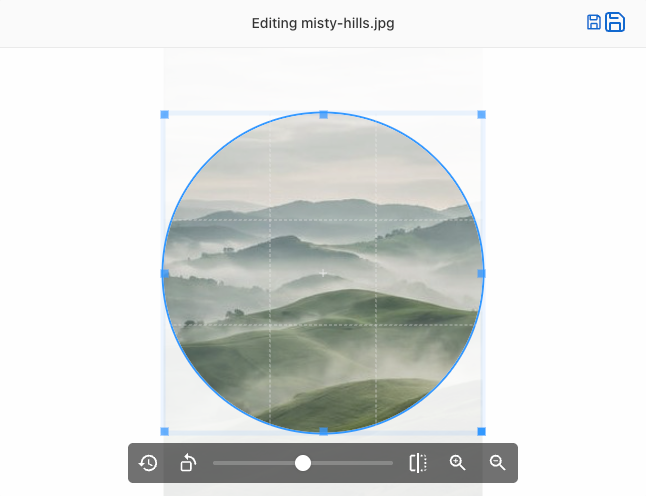
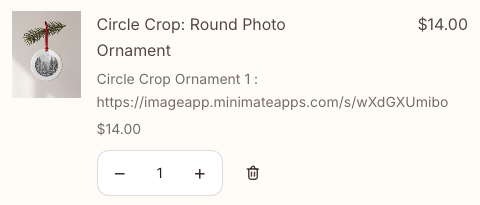
Mini: File Upload Image Upload adds a styled upload field above the Add to Cart button, lets the customer crop, rotate and preview the photo before checkout, and saves the file as a link on the order line. The image editor offers free-form, square or circle crop, so a round ornament gets a round photo.
The Premium plan ($7.90/month or $71.90/year) adds unlimited uploads, visibility per variant, custom styling, a required-field option and add-on pricing, so you can charge for the upload. You can also add a textbox, dropdown, checkbox or radio button next to the upload field, for a name or a size, and those answers travel with the file on the order.
For the setup itself, our guide to Shopify photo upload covers pixel sizes for common prints, and Shopify’s help page on managing orders shows where line item details appear in your admin.
One merchant who sells custom cake toppers described it like this:
“Customers can easily upload their images, crop them, and they show up in their carts and on our order page very clearly.”
The Party Room, New Zealand, January 19, 2026 (Shopify App Store review)
How to switch to an UploadKit alternative without losing open orders
Keep UploadKit installed until the new field has passed a test order. The switch takes about an hour.
- Download every UploadKit file you still need for open orders, because retention on Growing is up to 3 months.
- Install Mini: File Upload and turn on its app embed in the theme editor.
- Create the upload field with the same label, allowed file types and crop shape your customers already see.
- Choose the products or variants that show the field.
- Place a test order and check that the file link appears under the product in the order.
- Remove the UploadKit block from your theme, then uninstall UploadKit.
Step 6 matters: two upload fields on one product page confuse customers and split files between two apps.
How to choose
Run through these checks before you install an UploadKit alternative:
- Check the largest file a customer sent you last month. If any were over 200 MB, compare UploadKit Pro first.
- Check how long you need files after the order. If you print within a few weeks, 3 months is enough; if you reprint a year later, it is not.
- If your customers upload photos and you want them cropped to the product shape, Mini: File Upload covers that on every plan.
- If you charge for the upload, Mini: File Upload Premium adds the fee as its own cart line, or merges it into the product with the Bundling Function. UploadKit’s listing does not mention upload fees.
- If social proof decides it for you, weigh 86 reviews against 30, and read the most recent ones on both listings.
If you also need text and dropdown fields on many products, compare our other options in the Uploadly alternative post too.
Our honest take
I think most stores paying for an upload app are paying for capacity they never use. A phone photo is 3 to 10 MB, so a 200 MB or 5 GB cap is not what decides a photo shop’s choice; crop, preview and price are.
Our caveats are real. Mini: File Upload keeps files for 1 month on Starter and 3 months on Premium, so download them before then. It has no malware scanning, no Google Drive sync and no uploads after checkout. And our “Bundling Function” add-on charge uses Shopify’s Cart Transform, which can conflict with another bundle app on your store; the regular add-on line avoids that. If those gaps do not touch your products, it is the UploadKit alternative we would install first.
FAQ
What is the best UploadKit alternative for Shopify?
For customer photo uploads, Mini: File Upload Image Upload is the UploadKit alternative we recommend: $7.90/month, rated 5.0 from 30 reviews, with crop, rotate and preview before checkout. For files over 200 MB, UploadKit Pro covers a job our app is not built for.
How much does UploadKit cost?
UploadKit’s Growing plan is $9.95/month or $99.50/year, and its Pro plan is $24.95/month or $249.50/year, each with a 7-day trial. Its free plan is for Shopify Partner development stores only, as listed in November 2026.
What is UploadKit’s file size limit?
UploadKit allows files up to 200 MB on Growing and up to 5 GB on Pro, according to its Shopify App Store listing. If your customers send large layered design files, check those caps against your biggest recent file.
How long does UploadKit keep uploaded files?
Up to 3 months on Growing and up to 12 months on Pro. Mini: File Upload keeps files for 1 month on Starter and 3 months on Premium, so plan to download files when you fulfil the order.
Can customers crop their photo before uploading?
Yes, in both apps. Mini: File Upload offers free-form, square and circle crop plus rotate and preview on every plan. UploadKit lists crop, rotate, sharpen and auto-enhance.
Can I charge extra for an upload?
Yes, on Mini: File Upload Premium. You link a fee product, and the charge is added either as a separate cart line or merged into the product with Shopify’s Cart Transform. UploadKit’s listing does not mention add-on pricing.
Will I lose files when I uninstall UploadKit?
File links already saved on past orders stay on those orders, but the files themselves are hosted by the app. Download any you still need before you uninstall.