

At $5,000 a month in custom product sales, Kickflip bills $156.50: its $59/month Scale plan plus a 1.95% fee on each custom product sale. Mini:Custom Fields Personalize Premium is a flat $9.99/month at any sales level, carries the Built for Shopify badge and is rated 4.9 from 145 reviews (Kickflip: 4.3 from 140). If customers type a name, pick a color or upload a photo, CF is the Kickflip alternative to install. Stay on Kickflip if shoppers build the product visually from layers, like custom bats, because CF is a form, not a visual configurator.
Last updated November 2026
Disclosure: we build Mini:Custom Fields Personalize, so the field setup below comes from running it on our demo store. Kickflip’s prices and fee bands come from its Shopify App Store listing and pricing page, checked in November 2026.
In this post
- Kickflip vs Mini:Custom Fields Personalize at a glance
- What does Kickflip cost at your sales level?
- Do you need a configurator or product fields?
- What does Mini:Custom Fields Personalize do instead?
- When should you stay on Kickflip?
- How to switch in 5 steps
- How to choose
- Our honest take
- FAQ
Kickflip vs Mini:Custom Fields Personalize at a glance
Kickflip and CF solve different sizes of the same problem. This table compares their paid plans.
| App | Rating | Reviews | Paid pricing | Best for |
|---|---|---|---|---|
| Kickflip product configurators | 4.3 | 140 | $59/mo + up to 1.95% per sale | Visual multi-part products |
| Mini:Custom Fields Personalize | 4.9 | 145 | $5.99 or $9.99/mo | Text, swatch and upload fields |
Ratings, reviews and prices from each app’s Shopify App Store listing, as of November 2026. Mini:Custom Fields Personalize carries the Built for Shopify badge; the Kickflip listing does not show it.
Kickflip, formerly MyCustomizer, has been on the App Store since February 2020. For the wider field of personalization apps, see our roundup of the best Shopify product customizer apps.
What does Kickflip cost at your sales level?
Kickflip has one listed plan, Scale, at $59/month with unlimited products, plus a fee of 1.95% down to 0% on each custom product sale. Its pricing calculator applies 1.95% while monthly custom product sales stay under $100,000, and the rate only drops to 1.75% and lower above that, so the table below uses 1.95%.
| Custom product sales per month | Kickflip | CF Premium |
|---|---|---|
| $1,000 | $78.50 | $9.99 |
| $5,000 | $156.50 | $9.99 |
| $10,000 | $254.00 | $9.99 |
Kickflip: $59/month plus 1.95% of custom product sales, the rate its pricing calculator applies up to $100,000 a month; white-label (+$49/month) and Configure Price Quote (+$99/month) not included. CF Premium monthly billing; $95.90/year on yearly billing. As of November 2026.
Say you sell personalized cutting boards at $50 each and 100 of them go out a month. That is $5,000 in custom product sales, so the Kickflip bill is $156.50 for the month, while CF Premium, the Kickflip alternative in this table, stays at $9.99. Over a year that gap passes $1,700.
The fee is also the main pricing complaint in Kickflip’s reviews. In October 2026 Circa Watch Labs (United Arab Emirates) wrote that the sales fee is kept on cancelled and refunded orders, and in June 2026 Topper Addicted (United States) objected to moving from a “Pay as You Grow” plan to a monthly fee of about $60.
Do you need a configurator or product fields?
A product configurator builds the product image from parts as the shopper chooses them; product fields collect the shopper’s choices next to your normal product photos. Many stores searching for a Kickflip alternative need the second one and are paying for the first.
| What you sell | What you need | App to use |
|---|---|---|
| Engraved jewelry, name signs | Text field, font choice | CF |
| Embroidered blankets, towels | Text, thread color swatch | CF |
| Photo gifts, pet portraits | Upload with preview | CF |
| Custom bats, bikes, furniture | Layered visual builder | Kickflip |
| Quote-based B2B products | Configure Price Quote | Kickflip |
We build Shopify apps for a living, so our advice is to check your own orders before you pick a tool: if most of them carry one name and one color, a visual builder is more than the job needs. The questions that reach our own site from Google read the same way, for example “are there more affordable alternatives to kickflip product customizer for products with multiple personalization choices?” (Search Console, last 90 days to November 2026).
What does Mini:Custom Fields Personalize do instead?
Mini:Custom Fields Personalize adds input fields to your existing product page: textbox, dropdown, radio, checkbox, date picker, number input, file upload, image swatch, color swatch and font selector, with conditional logic and fields per variant. The shopper’s answers are saved with the cart line and the order.
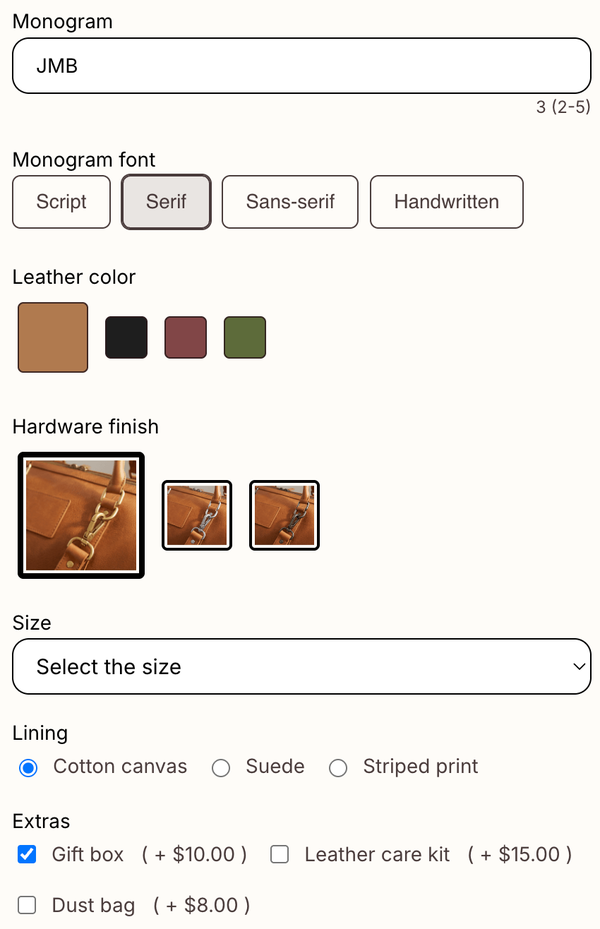
- Basic ($5.99/month or $47.90/year): unlimited fields, date picker, conditional logic, required validation and translations.
- Premium ($9.99/month or $95.90/year): adds file uploads up to 200 MB, image swatches, add-on prices and visibility per variant.
- Live preview: text and uploaded images show on the product image for textbox and upload fields.
Add-on prices work as a separate cart line, not by changing the product price. The trade-off is that a customer who edits the cart can remove that line and keep the product. Our guide to charging extra for personalization covers the setup, and our post on product preview for personalization explains what the live preview shows.
“I installed the app and 1 minute later I had a new field up and working. You guys understand SIMPLE.”
Prof Pierre.ca, Canada, July 17, 2026 (Shopify App Store review)
When should you stay on Kickflip?
Stay on Kickflip if the product image itself has to change part by part as the shopper builds it. This table maps those needs:
| What you need | Kickflip | CF |
|---|---|---|
| Layered multi-part preview | Yes | No |
| Live coloring of product areas | Yes | No |
| Preview from several angles | Yes | No |
| Quote requests | +$99/mo add-on | No |
| Text, swatch, upload fields | Yes | Yes |
| Flat price, no sales fee | No | Yes |
Kickflip features from its Shopify App Store listing; CF features from our own listing, as of November 2026.
If your best seller is a baseball bat where the shopper picks wood, handle color, cup and engraving and watches the bat change, a field-based Kickflip alternative would take that experience away. That is a real reason to pay the fee.
How to switch to a Kickflip alternative in 5 steps
Keep Kickflip running until the new fields pass a test order on one product, so shoppers never see a product page without its options while you set up the Kickflip alternative.
- List the choices each Kickflip product offers, and note which ones change the price.
- Install Mini:Custom Fields Personalize and turn on its app embed in the theme editor.
- Rebuild those choices as fields: a textbox for names, a color or image swatch for colors, an upload field for photos.
- Add product photos that show the main color and style options, since there is no layered preview.
- Place a test order, check the order shows every choice, then remove Kickflip from the product template.
Shopify’s own product options documentation is a good baseline for which choices can stay as native variants.
How to choose
Use these checks before you install any Kickflip alternative:
- Add up last year’s custom product sales and apply 1.95% plus $708 a year. Under $100,000 a month in custom sales, that is your Kickflip bill before add-ons.
- Look at your last 50 personalized orders. If most are a name, a color or a photo, fields cover them.
- If shoppers need to see the product change part by part before buying, stay on Kickflip.
- If you charge for extras, decide whether a separate add-on cart line works for you.
- If you also compare other builders, our Shopify product configurator guide explains the difference in more depth.
Our honest take
I think a percentage of sales is the wrong way to price a personalization tool for most small stores. A name field does not cost more to run on a $200 order than on a $20 one, so a fee that grows with revenue charges you for success, not for usage.
CF has real limits. It has no 3D, no layered preview, no live coloring and no quote requests, the live preview covers textbox and upload fields only, and uploads and add-on prices need Premium. If your product needs a visual builder, choose Kickflip. If it needs a name, a color and a photo, CF is the Kickflip alternative we would install first.
FAQ
What is the best Kickflip alternative for Shopify?
For products personalized with text, swatches and uploads, Mini:Custom Fields Personalize is the Kickflip alternative we recommend: $9.99/month on Premium, no sales fee, rated 4.9 from 145 reviews. For layered visual builders, compare other configurator apps instead.
How much does Kickflip cost?
Kickflip lists one plan, Scale, at $59/month plus 1.95% to 0% per custom product sale, with a 14-day free trial. White-label is +$49/month and Configure Price Quote is +$99/month, as listed in November 2026.
Does Kickflip charge a transaction fee?
Yes. Kickflip charges 1.95% on each custom product sale while your monthly custom product sales stay under $100,000, on top of the $59 monthly plan. Its pricing calculator lowers the rate in bands above that, down to 0% at the highest volumes.
Kickflip pricing compared to other customization tools: what is the smartest choice for a growing store?
For a store whose sales are growing, a flat monthly price keeps the tool cost the same as orders rise. Mini:Custom Fields Personalize is $9.99/month at any sales level; Kickflip’s 1.95% fee grows with every sale until you pass $100,000 a month in custom product sales.
Is Kickflip the same as MyCustomizer?
Yes. Kickflip was formerly called MyCustomizer, and its Shopify App Store listing still uses the mycustomizer address.
Does Mini:Custom Fields Personalize have 3D preview?
No. CF shows a live preview of text and uploaded images on your product photo, but it has no 3D, no layered parts and no live coloring.
Can I charge extra for personalization without Kickflip?
Yes. On CF Premium you set a fixed add-on price per option, and the charge is added to the cart as a separate line item.