
If you are asking “why does my Shopify product say sold out” while the admin shows stock, the answer is almost always one of 7 settings: tracked quantity at 0, stock held at a location that does not fulfill online orders, no fulfilling location that ships to the shopper, a sold-out variant selected by the link, a minimum quantity rule above stock, an inventory app writing 0 back, or the product is truly sold out. Each check below takes about 2 minutes.
Disclosure: we build Restock Alert & Waitlist – Mini, a back in stock app. It only matters for the last cause, when the product really is sold out; the first 6 fixes are Shopify settings that need no app.
In this post:
- Find your cause in 30 seconds
- Cause 1: tracked quantity is 0
- Cause 2: stock sits at the wrong location
- Cause 3: sold out only for some shoppers
- Cause 4 and 5: a variant link or a quantity rule
- Cause 6: an app writes 0 back
- Cause 7: it really is sold out
- FAQ
Why does my Shopify product say sold out? Find your cause in 30 seconds
Start from what you see on the storefront, then jump to the matching fix:
| What you see | Likely cause | Where to fix |
|---|---|---|
| New or imported product says Sold out | Tracked quantity is 0 | Product > Inventory |
| Admin shows stock, store says Sold out | Stock at a non-fulfilling location | Settings > Locations |
| Sold out for some countries only | No fulfilling location ships there | Settings > Shipping and delivery |
| Collection card fine, product button Sold out | Link opens a sold-out variant | Variant stock or the link |
| Sold out with a few units left | Minimum quantity rule above stock | Quantity rules (B2B) |
| Stock resets to 0 after you fix it | Inventory or POS sync app | The app’s sync settings |
| Every check passes | Truly sold out | Message and notify-me form |
Cause 1: Is the tracked quantity at 0?
When “Inventory tracked” (labeled “Track quantity” in older admins) is on and the variant’s available quantity is 0 or below, Shopify marks it unavailable and the theme prints Sold out. This is the most common cause on new and imported products, because the importer creates the variant with tracking on and no stock. Open the product, scroll to Inventory, and either enter the real quantity or tick “Continue selling when out of stock” if you make to order. Shopify’s guide to selling when out of stock notes that this option only exists while tracking is on.
Cause 2: Is the stock at a location that fulfills online orders?
Stock only counts online if it sits at a location that fulfills online orders. This is the usual answer to “why does my Shopify product say sold out” in stores with a shop and a warehouse. If your units are recorded at a shop, a warehouse or a pop-up that is not set to fulfill online orders, the admin shows a positive number and the storefront still says Sold out. Go to Settings > Locations, open each location and check its fulfillment setting, or move the stock to the location that ships.
Cause 3: Why does my Shopify product say sold out for some shoppers only?
Shopify’s fulfillable inventory setting marks a product available only where a location with stock can deliver to the shopper’s shipping zone. Stores created in April 2024 or later always use this setting and cannot switch it off, according to Shopify’s fulfillable inventory guide (checked November 2026). So a shopper in Canada can see Sold out while you see the product in stock from the US. Add the missing country to a shipping zone served by a location that holds stock.
Cause 4 and 5: Is a variant link or a quantity rule showing Sold out?
On the product page, the button follows the selected variant, while the collection card badge only says Sold out when every variant is unavailable. That is how Dawn, Shopify’s reference theme, renders it (checked in the public Dawn code, November 2026). A link from an ad, a Google Shopping listing or an email that carries ?variant= for the pink size S will open on that sold-out variant, even when 40 other combinations are in stock. Fix the stock on that variant, or update the link.
The second variant trap is a quantity rule. If you sell to B2B customers with a minimum order of 6 and only 4 units are left, Dawn shows Sold out for that buyer even though the stock is above 0.
Cause 6: Is an app writing 0 back?
If you fix the number and it drops back to 0 within minutes, something else owns that inventory. Inventory sync tools, ERP connectors, dropshipping apps and POS integrations can overwrite Shopify’s count on every sync. Check the product’s inventory adjustment history to see which app or staff member made the last change, then fix the number in that system, not in Shopify.
Cause 7: What should you do when it really is sold out?
Keep the page selling something: a clear message and a way to hear about the restock. A bare Sold out button sends the visitor back to Google. Our guide to the Shopify out of stock message covers the wording; this is the part that keeps the demand.
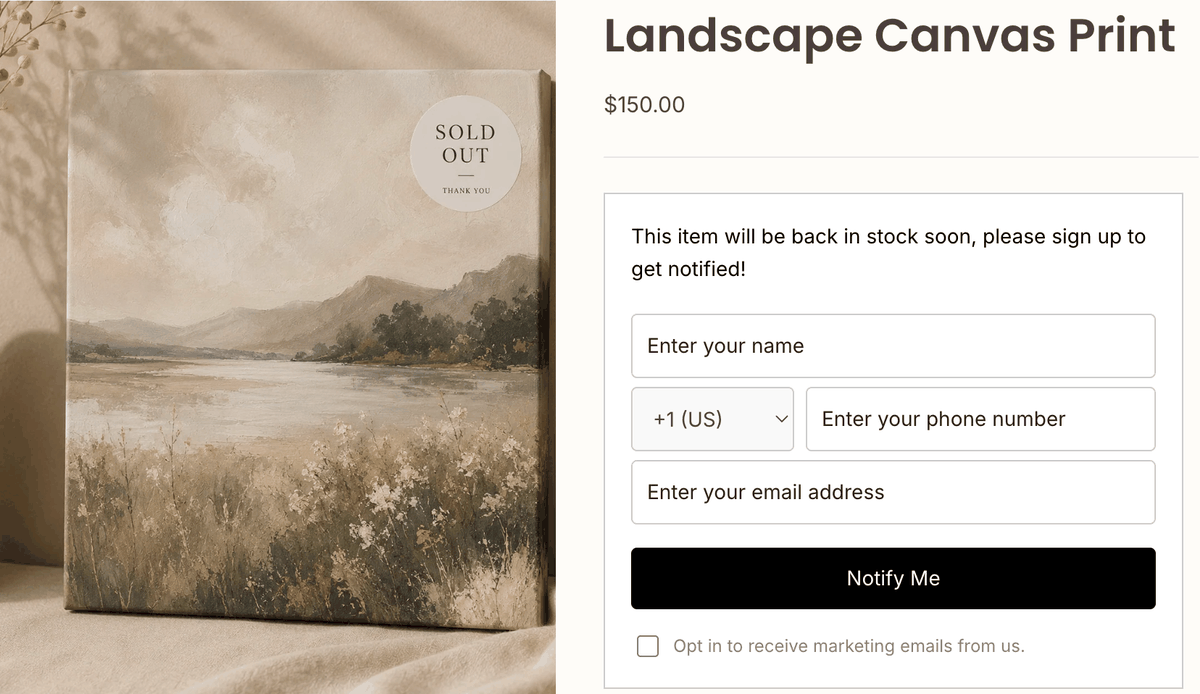
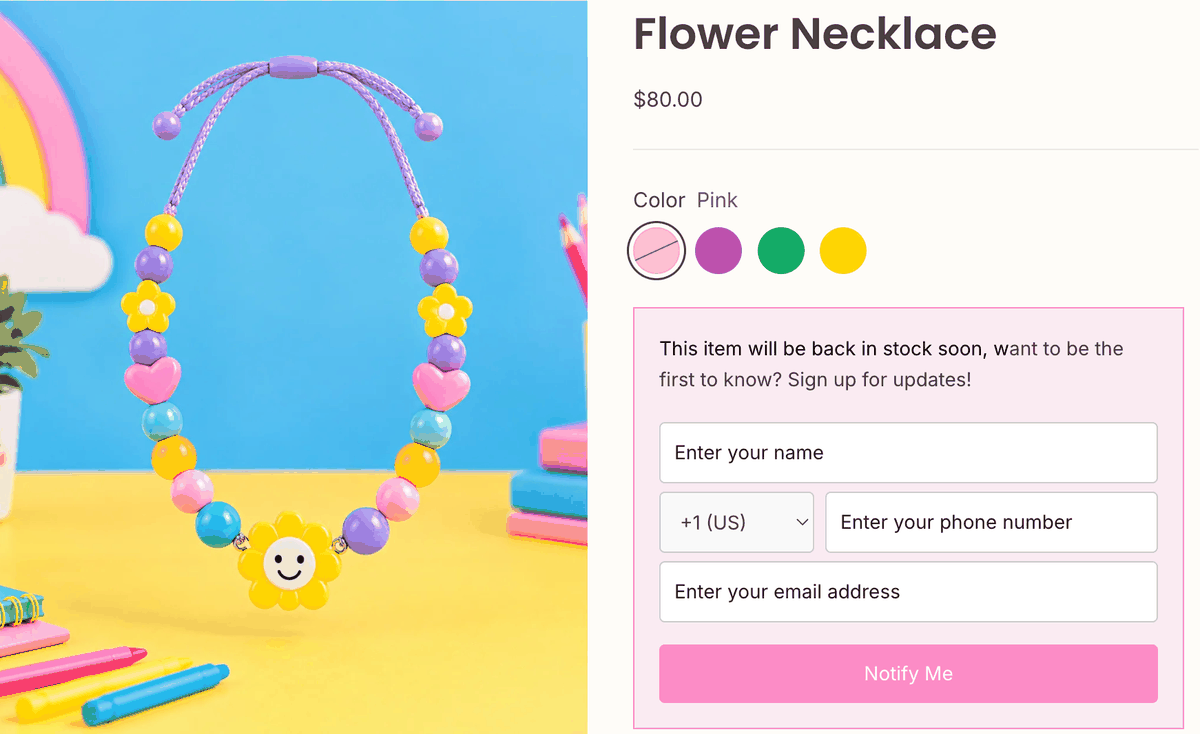
With Restock Alert & Waitlist – Mini, a notify-me form replaces the dead button on sold-out products, and every signup gets an automatic email when the stock comes back. It works per variant, so the form shows only on the sold-out size or color:
- Free plan: 1 product, 250 restock emails a month.
- Premium: $8.99/month or $83.88/year, unlimited emails, Shopify Flow, CSV export and a custom sending domain (as of November 2026). The CSV export is your reorder signal: the signup list shows how many people wait for each product before you place the supplier order.
- Rated 4.7 from 39 reviews, Built for Shopify.
Our App Store data shows how merchants describe this need. In the last 90 days, “waitlist” brought 36 installs of our app and “restock alert” brought 9. Merchants think in terms of a list of people waiting, which is the right way to see a sold-out page. A small workshop business in the US put it this way: “This is the perfect app for a small store like ours” (Mountain Intaglio, United States, 28 December 2024), using it to manage waitlists for limited-space workshops.
For more options, see our best Shopify back in stock apps roundup and the guide to variant-level restock notifications.
Fix it or wait for stock: how to choose
- Admin shows stock: the answer to why does my Shopify product say sold out is a setting (causes 1 to 6). Fix the setting; no app needed.
- You make to order: turn on “Continue selling when out of stock” and say the lead time on the page.
- You are waiting on a supplier: keep the product live with a notify-me form and email the list the day stock lands.
Our opinion: most stores hide sold-out products too early. A product that sold out has proven demand, and its page often still ranks. When someone asks “why does my Shopify product say sold out”, the real question is usually whether that page is still earning anything. The honest caveat about our app: Restock Alert & Waitlist – Mini sends email alerts only, with no SMS, no Klaviyo sync and no pre-orders, so if you want to take money before the restock, you need a pre-order app instead.
FAQ
Why does my Shopify product say sold out when I have inventory?
The stock is usually at a location that does not fulfill online orders, or no fulfilling location ships to the shopper’s country. Check Settings > Locations first, then your shipping zones.
Why do all my Shopify products say sold out?
If every product changed at once, look for a bulk import or a sync app that set quantities to 0, or a location whose online fulfillment was switched off. The inventory adjustment history shows which one made the change.
How do I remove sold out on Shopify without adding stock?
Tick “Continue selling when out of stock” on the product or variant, or turn off “Inventory tracked”. Only do this if you can fulfill orders placed at zero stock.
Why does my product say sold out on one size only?
The button follows the selected variant. If that size is at 0, it says Sold out while other sizes sell normally. Links that include a variant ID open on that exact size.
Is “sold out” a Shopify glitch?
Rarely. Work through causes 1 to 6 first: a location, a shipping zone, a variant, a quantity rule or a sync app explains it far more often than a bug. Open the page in a private window after each change so you see what shoppers see.
Why does my Shopify product say sold out after I restocked it?
Check that you added the units at a location that fulfills online orders, then reload in a private window. If the number drops back to 0, a sync app is overwriting it.
How do I let customers sign up when a product is sold out?
Add a back in stock app such as Restock Alert & Waitlist – Mini, which shows a notify-me form on sold-out products and variants and emails each signup on restock. Our notify me button guide shows the setup.