

A Shopify gift wrap option on the product page takes 5 steps with an app field: a “Gift wrap” checkbox, a $5 add-on price, an optional wrap style swatch, a gift note that appears only when the box is ticked, and one test order. Shopify has no built-in gift wrap checkbox for product pages, so the no-app routes are a separate “Gift wrap” product or a wrapped variant. Mini:Custom Fields Personalize (Built for Shopify, 4.9 from 147 reviews) does the paid version on Premium at $9.99/month and saves the wrap choice on the exact item it belongs to.
Disclosure: we build Mini:Custom Fields Personalize and the add-on charge this post describes, so the steps and the caveat about the wrap line come from running it, not from a spec sheet.
In this post:
- What are the ways to offer gift wrap on Shopify?
- How to offer gift wrap without an app
- How to add a Shopify gift wrap option in 5 steps
- Where the gift wrap charge shows up
- Per item or per order pricing
- Dedicated gift wrap app or a fields app?
- How to choose
- FAQ
What are the ways to offer a Shopify gift wrap option?
There are four routes: a gift wrap product, a wrapped variant, a theme cart toggle, or a product page field. What separates them at the packing table is whether the wrap is tied to its item. This table maps each need to its setup:
| What you want | How to do it | Where it lives |
|---|---|---|
| One wrap fee per order | “Gift wrap” product added in the cart | Its own cart line, no app |
| Wrap priced into the item | Variant “Gift wrapped: Yes / No” | The variant, no app |
| Free wrap, item by item | Checkbox field on the product page | Line item property |
| Paid wrap, item by item | Checkbox with an add-on price | Property plus a separate charge line |
| Choice of wrap papers | Image swatch, price per paper | Property plus a charge line |
| A gift note only | Textbox field or the cart note | Property or order note |
If you only need the note, see our guide to offering gift messages on Shopify.
How do you offer gift wrap on Shopify without an app?
Create a product called “Gift wrapping” and let shoppers add it to the cart. Shopify’s own guide to gift wrapping in ecommerce calls this the most universal setup: it works on every plan as a normal line item.
- Add a product “Gift wrapping” at your price, for example $5, with inventory tracking off.
- Untick “This is a physical product” if the wrap should not add shipping weight.
- Link it from the cart or the product description, and relabel the cart note “Gift message (optional)”.
Why is this not enough for most gift shops? Because the wrap line floats: with 3 items and 1 wrap line, your packer guesses which item to wrap. A wrapped variant fixes that but doubles your variants, so a mug in 4 colors becomes 8. Some themes ship a cart gift wrap toggle; it still charges per order, not per item.
How to add a Shopify gift wrap option to product pages in 5 steps
A field-based Shopify gift wrap option sits next to Add to cart and saves the choice on the exact item. With Mini:Custom Fields Personalize:
- Install Mini:Custom Fields Personalize and turn on its app embed in the theme editor.
- Create a Checkbox field labeled “Gift wrap this item” and give the option an extra charge, for example $5.00. Extra charges are part of Premium ($9.99/month or $95.90/year, as of November 2026).
- Optional: add an Image Swatch “Wrap style” with a photo and price per paper (Kraft free, Red foil +$2). Our gift box store setup walks through the wrap style swatch in detail.
- Add a Textbox “Gift note” with a 200 character limit, and use conditional logic so it appears only when the gift wrap box is ticked. Conditional logic starts on Basic ($5.99/month); the wrap charge from step 2 needs Premium.
- Assign the fields to giftable products, then test: tick the box, add the item twice, check the cart.
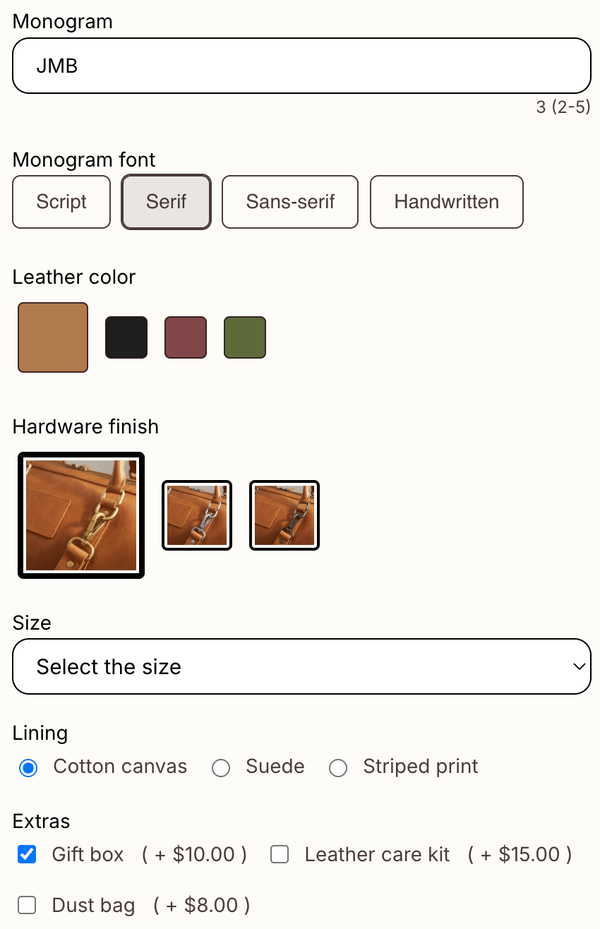
The demo product uses a $10 gift box instead of a $5 wrap; the mechanics are identical. A hamper shop in Australia described the result in a March 2026 review: “We are really enjoying the flexibility it gives us to add personalisation and up sell products” (Custom Hampers, Australia, 30 March 2026).
Where does the gift wrap charge show up in the cart?
As its own line. When a shopper ticks a priced Shopify gift wrap option in Mini:Custom Fields Personalize, the charge is added as a separate cart line item, while the choice and the note stay on the product line as properties. It does not use Cart Transform, so it does not compete with bundle apps.
The honest caveat: because the charge is a separate line, a shopper can remove it and keep the product. Before you wrap, check that paid wrap orders still carry the charge line. Our post on how to charge extra for personalization explains the mechanism in full.
Should gift wrap be priced per item or per order?
Per item if you wrap items separately, per order if everything goes in one box. That answer picks your setup: a field for per item, a cart product for per order.
Say you sell 400 candles in December and 1 in 4 buyers ticks a $5 wrap. That is 100 wraps and $500, against roughly $1.50 of paper and ribbon each, so about $350 left to pay for the 3 minutes each wrap takes. Charge per order on a 3-candle cart and you wrap 3 candles for one $5 fee. Test a quantity of 2 before launch so the charge matches what you wrap.
Should you use a dedicated gift wrap app or a fields app?
A gift wrap app fits when gifting is the whole job, checkout blocks included. A fields app fits when the page also needs engraving or a monogram:
| App | Rating | Reviews | Paid plans | Built around |
|---|---|---|---|---|
| Wrapped: Gift Wrap & Messages | 4.7 | 142 | From $19/mo | Gift blocks, payment page blocks on paid plans |
| Wrapwell: Gift Wrap & Message | None yet | 0 | From $4.99/mo | Cart wrap styles, launched October 2026 |
| Mini:Custom Fields Personalize | 4.9 | 147 | $5.99 and $9.99/mo | Product page fields with add-on charges |
Ratings, reviews and prices from each app’s Shopify App Store listing, as of November 2026. Wrapped’s $19/month plan covers stores up to $10k a month in gift sales.
How to choose your Shopify gift wrap option
- One wrap fee per order, no app budget: the “Gift wrapping” product in the cart.
- Wrap per item, or wrap next to engraving or a name field: a priced checkbox on the product page.
- Several papers: an image swatch with a price per paper.
- Gift receipts or checkout gift blocks: a dedicated gifting app.
We build Shopify apps for a living, so we look at the part most guides skip: what the wrap choice looks like on the order your packer reads. In the last 90 days, nobody reached our App Store listing by searching “gift wrap”; merchants searched “textbox” (22 installs, 19 of them through our ads) and “custom fields” (17).
Our opinion: a Shopify gift wrap option is a priced checkbox, and most stores do not need a separate app for it: the checkbox saves the wrap on the item it belongs to. One real caveat about our own app: the wrap charge line can be removed on its own, and Mini:Custom Fields Personalize has no checkout fields, so the option lives on the product page only.
More extras: our guide to adding custom fields to product pages.
FAQ
Does Shopify have a built-in gift wrap option?
Not on the product page. Shopify suggests a “Gift wrapping” product added from the cart, or a theme or app gift wrap block. Some themes include a cart toggle, so check your theme settings first.
How do I add gift wrapping to my Shopify store?
Without an app, create a “Gift wrapping” product and link it from the cart. With an app, add a priced checkbox to your product pages, as in the 5 steps above.
Can I charge extra for gift wrap on Shopify?
Yes. A wrap product charges per order; a priced checkbox in Mini:Custom Fields Personalize adds the charge as its own cart line (Premium, $9.99/month).
Can customers choose a wrapping paper style?
Yes, with an image swatch field showing a photo of each paper. Each paper can carry its own price; image swatches are part of Premium.
How do I show a gift message box only when gift wrap is selected?
Use conditional logic, so the note field appears only when the gift wrap box is ticked. It starts on the Basic plan at $5.99/month.
Can I add a gift wrap option at checkout?
Mini:Custom Fields Personalize has no checkout fields, so its option lives on the product page. Checkout gift blocks need a checkout extension app, often for Shopify Plus stores only.