

Adding a gift message shopify field to a product page takes one custom field: a multi-line textbox, optionally with a character limit. Mini:Custom Fields Personalize’s Free plan covers that single field at no cost. Charging extra for gift wrapping on top of it needs a Premium add-on charge ($9.99/month). This post covers both setups in under 10 minutes, plus how the message text actually reaches you for fulfillment.
In this post:
- What “gift message” means as a Shopify field
- Step-by-step: adding a gift message textbox
- Optional: charging for gift wrapping as an add-on
- Which plan you need
- Getting the message text into your order
- A real limit worth knowing
- FAQ
What “Gift Message” Means as a Shopify Field
Shopify has no native gift message field on the product page. Every gift message shopify setup we’ve seen resolves to one of two field types: a free-text textbox (the customer types their own note) or a dropdown of preset messages (the merchant writes 3-5 canned options and the customer picks one). Most merchants want the free-text version, since gift notes are personal by nature, and that’s what this post walks through.
A dropdown works if you’d rather avoid moderating open text, for example if the product ships with a printed card and you only have room for short, pre-approved phrases. Both use the same underlying field type in Mini:Custom Fields Personalize; the dropdown just restricts what the customer can enter.
Step-by-Step: Adding a Gift Message Textbox to Your Product Page
In Mini:Custom Fields Personalize, a gift message shopify field takes four steps. First, open the app from your Shopify admin and add a new Textbox field and set the label to something a customer will recognize immediately, “Add a gift message” reads better than “Notes.”
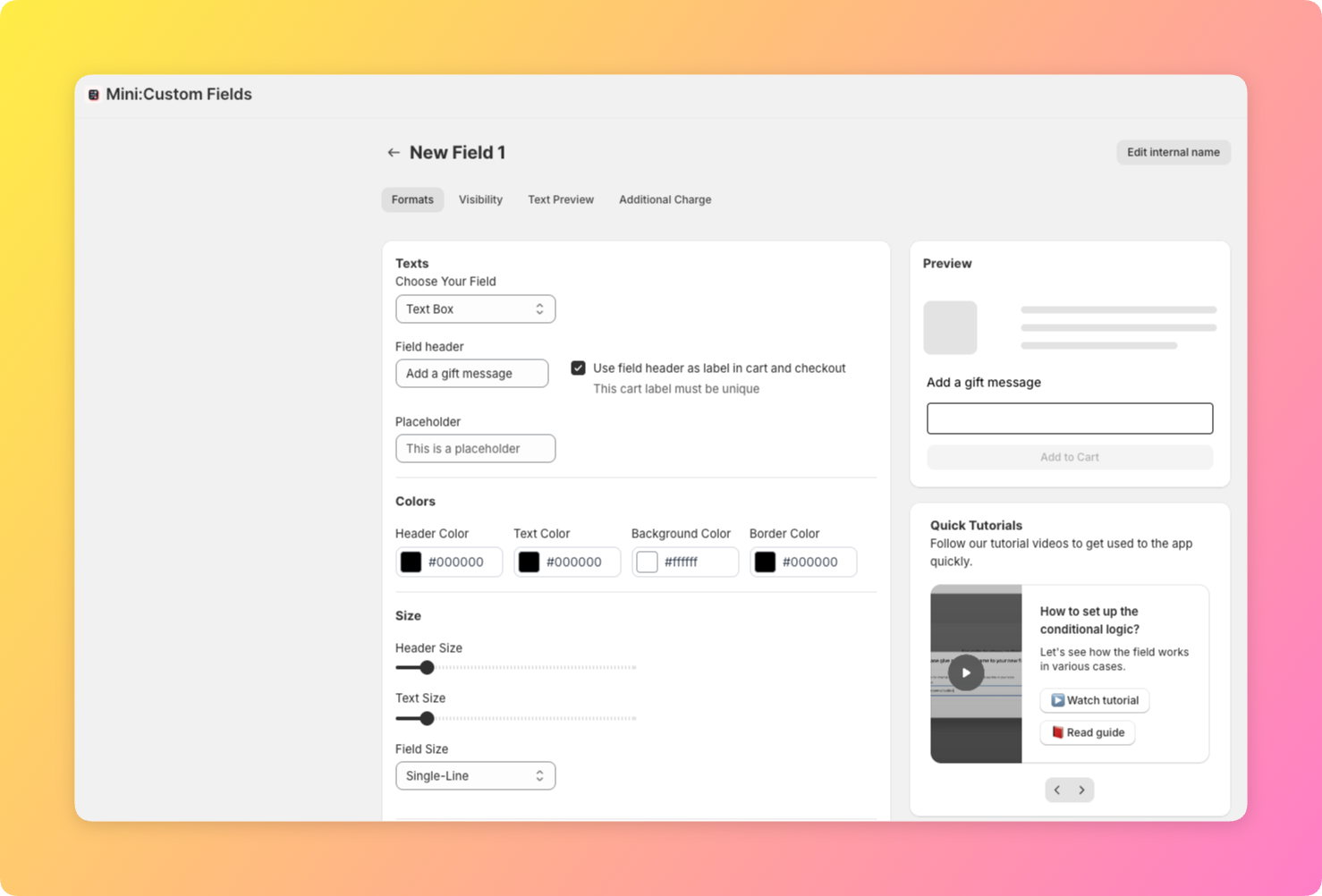
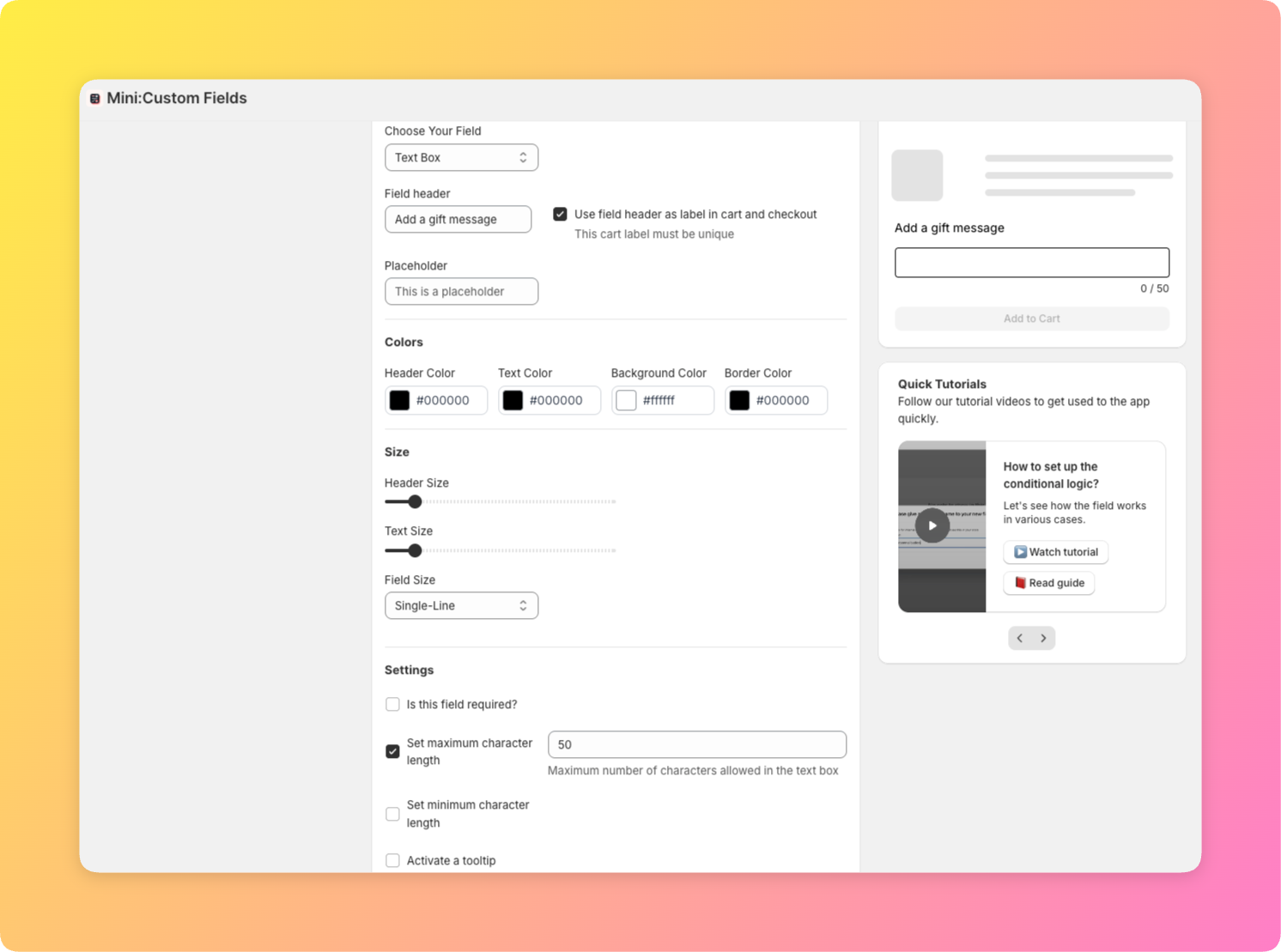
Second, decide whether the field is required or optional, optional is the right default for a gift message, since not every buyer is sending a gift.
Third, set a character limit. Most stores cap this between 150 and 300 characters, long enough for a real note, short enough that it fits on a packing slip or gift card without wrapping awkwardly.
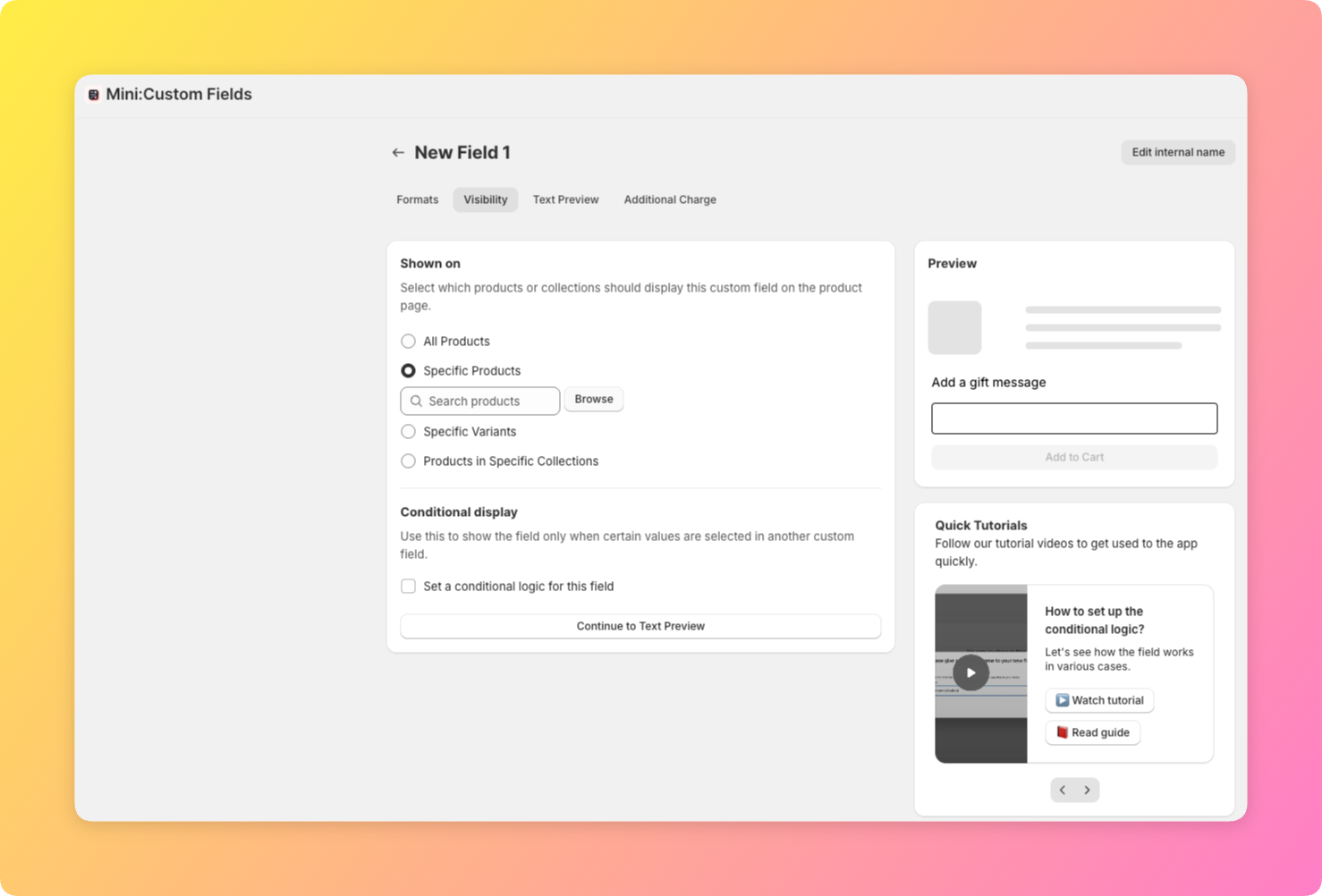
Fourth, select the product (or products) that should offer a gift message.
Optional: Charging for Gift Wrapping as an Add-On
The gift message itself doesn’t need to cost anything, most stores treat it as a free courtesy. Gift wrapping is a different story: if you want to charge for a box, ribbon, or wrapping paper, Mini:Custom Fields Personalize’s add-on pricing feature lets you attach a flat fee to a checkbox field like “Add gift wrap ($3.00).” This is a Premium-tier feature ($9.99/month), separate from the Basic-tier textbox field the gift message itself runs on.
A common setup pairs both: a free gift message textbox plus a paid gift-wrap checkbox, shown together so the customer can add either, both, or neither in one pass through the product page.
Which Plan You Need
Here’s the plan breakdown for a gift message shopify setup, from a single free field to the full gift-wrap add-on:
| Plan | Price | Covers gift messages |
|---|---|---|
| Free | $0 | 1 textbox field total, enough for a free-text gift message alone |
| Basic | $5.99/month | Unlimited fields, useful if you also run other custom fields on the same products |
| Premium | $9.99/month | Adds add-on pricing, needed only if you charge for gift wrapping |
A gift message textbox alone fits comfortably on the Free plan. The add-on charge for gift wrap is what actually requires Premium, not the message field itself, worth stating plainly since merchants often assume anything gift-related must be a paid feature.
Getting the Gift Message Text Into Your Order for Fulfillment
Once a customer submits a gift message shopify field, the text is stored as line-item properties on the order, visible in your Shopify admin order view and on the packing slip if your packing slip template includes custom field data. No separate app or export step is required, the text travels with the order the same way a variant selection does.
“Not only is the app easy to use, it’s highly customisable and solved a lot of legacy issues. On top of this the support is second to none and they go above and beyond. I’ve gone through a lot of apps over the years but I would put this top of my list overall in terms of service and performance.”
Source: The Precious People, United Kingdom (Shopify App Store review)
A Real Limit Worth Knowing: Character Limits and Required-Field Settings
We build custom field types for a living, so we get the “can I add a gift note box” support question constantly, especially once Q4 gifting traffic starts. The honest gripe worth stating here: Shopify itself still has no native gift message option, three years after “gift wrapping” became a standard checkout ask, which is why this remains app territory instead of a built-in setting.
One practical mistake to avoid on any gift message shopify field: setting it as required. A required field blocks checkout for every customer, including the ones not buying a gift, which is the single most common support ticket we see tied to this setup. Keep it optional unless the product is explicitly a gift-only listing.
Shopify’s own metafields documentation is worth a look if you want to understand how structured product data works natively, since Shopify has no built-in equivalent to app-level custom fields.
See our guides on Shopify product add-ons and adding a personalization option on Shopify for more on building out a full custom field setup around gifting and personalization.
Frequently Asked Questions
- 1. Can I add a gift message box to a Shopify product page without an app?
- No, Shopify has no native gift message field on the product page. A gift message shopify setup requires an app like Mini:Custom Fields Personalize to add a textbox field.
- 2. Does Shopify have a native gift message field?
- No, gift messages are not a built-in Shopify feature. Merchants add one through a custom textbox field via an app.
- 3. Can I charge extra for gift wrapping using a custom field?
- Yes, using an add-on charge attached to a checkbox field, a Premium-tier feature in Mini:Custom Fields Personalize starting at $9.99/month.
- 4. Is a gift message field required or optional for the customer?
- It should be optional in almost every case. Making it required blocks checkout for customers who aren’t buying a gift.
- 5. How does the gift message text reach me for fulfillment?
- It’s saved as a line-item property on the order, visible in your Shopify admin and on the packing slip if your template includes custom field data.
- 6. Can I limit how many characters a customer can type in the gift message?
- Yes, most stores set a character limit between 150 and 300 characters when configuring the textbox field.



