
Adding a notify me button shopify shoppers can actually use takes an app that swaps the sold-out “Add to cart” button for a signup form, plus a way to send the restock email once the item is back. Restock Alert & Waitlist ‑ Mini does both automatically on Online Store 2.0 themes, no theme code required. This post covers the setup, plus a real third-party-app conflict worth checking for before you turn it on.
In this post:
- What a Notify Me button actually replaces
- Step-by-step: turning on the button
- Automatic vs. variant-specific targeting
- A real conflict to check for
- Which plan you need
- How the restock email actually gets sent
- FAQ
What a “Notify Me” Button Actually Replaces on Your Product Page
When a product sells out, Shopify’s default behavior is to either hide the “Add to cart” button or leave a disabled, greyed-out version in place, neither one captures the sale you just lost. A notify me button shopify apps add in that same spot swaps the disabled button for a small signup form, usually just an email field, so the shopper can leave their address instead of leaving the page entirely.
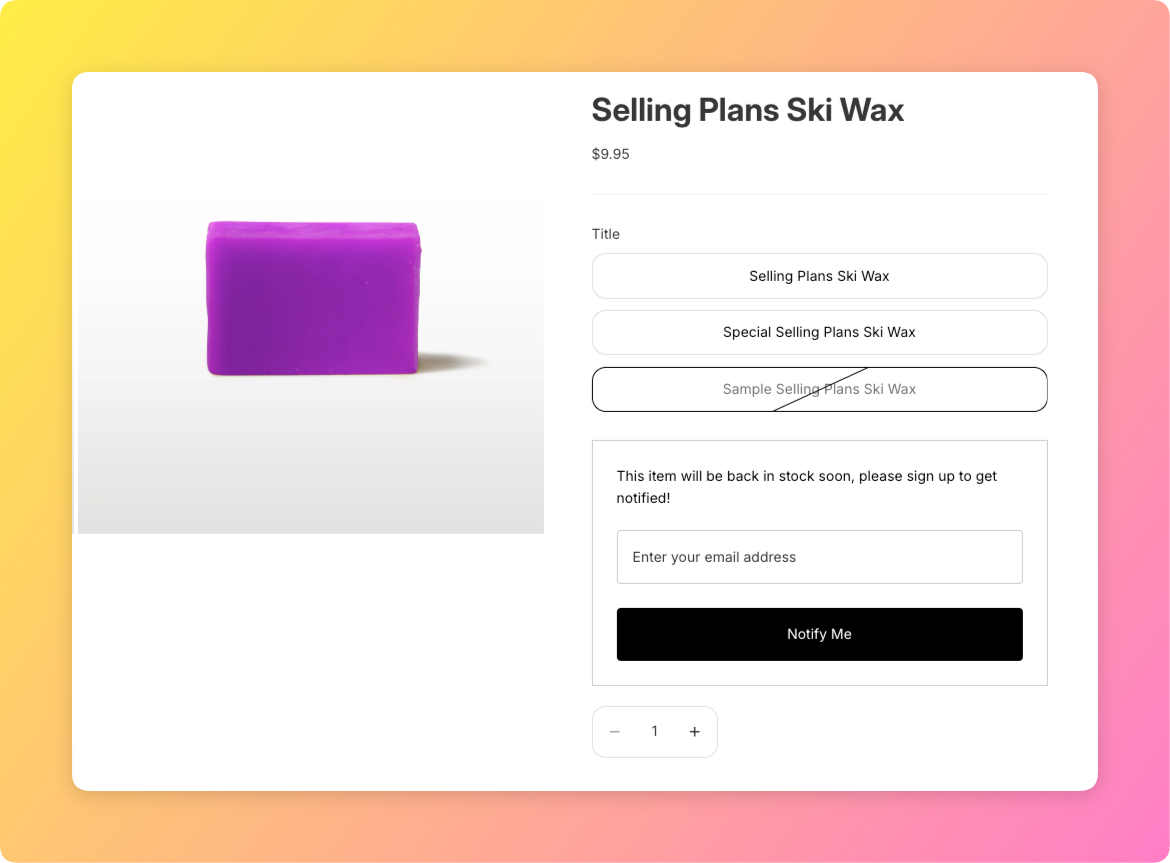
The button itself is the visible part, but it’s only useful if what happens after someone clicks it actually works: the email needs to be captured reliably, tied to the right product and variant, and triggered correctly once that exact variant restocks.
Step-by-Step: Turning On the Notify Me Button
Restock Alert & Waitlist ‑ Mini offers two activation methods on Online Store 2.0 themes: an app embed, which is a store-wide toggle in the Theme Editor, or an app block, added per product template section. Most stores only need the app embed, turned on once under Theme Editor > App embeds, and the notify me button shopify pages then show it automatically on any sold-out product.
If your theme’s product template was heavily customized, or the button doesn’t appear after enabling the embed, add the app block manually instead: Theme Editor > the product template > Add block, then select the waitlist form block. This is the same app-embed-vs-app-block distinction that trips merchants up on other Custom Fields setups, and it applies here too.
Automatic Sold-Out Detection vs. Targeting Specific Variants
By default, the notify me button shopify storefronts display appears automatically whenever a product or variant shows zero available inventory, no manual configuration needed per product. You can also scope it manually, showing the form only on selected products or collections, which is useful if you only want waitlist capture on a specific launch item rather than store-wide.
Variant-level targeting matters most for apparel and similar products: if only the size Large is sold out, the button should appear for that variant specifically, not the whole product. Restock Alert & Waitlist ‑ Mini handles this at the variant level by default, so a shopper choosing an in-stock size never sees a signup form they don’t need. If you have not decided whether a waitlist is the right tool for a given product yet, our guide on how to create a waitlist on Shopify covers that decision first.
A Real Conflict to Check For: Cart-Drawer Apps Like UpCart
Why does a notify me button shopify merchant occasionally report the signup “not working” when the app itself is functioning correctly? In our own bug history, the most common cause is a cart-drawer app, UpCart is the one we’ve seen most often, that intercepts the button click and opens the cart drawer instead of letting the waitlist form submit. The email is never captured, and neither app shows an error, which makes it a frustrating one to diagnose from the merchant side.
The honest fix here is a workaround, not a permanent one: if you run a cart-drawer app alongside Restock Alert & Waitlist ‑ Mini, test the notify me button specifically after installing or updating either app, don’t assume compatibility just because both apps work fine independently.
Which Plan You Need
| Plan | Price | What’s included |
|---|---|---|
| Free | $0 | 1 product, 250 restock emails per month |
| Premium | $8.99/month or $83.88/year | Unlimited emails, Shopify Flow, CSV export, custom email domain |
The Notify Me button itself is available on both plans, the limits are on volume, not on whether the button shows up. A store adding the button to more than one product will hit the Free plan’s product cap first, before the email volume ever becomes a factor.
How the Restock Email Actually Gets Sent Once Someone Signs Up
Submitting the notify me button shopify form creates a tagged customer record tied to that exact product and variant. When the variant’s inventory goes from zero back to a positive number, a webhook fires, an email queue record is created for every customer waiting on that variant, and the email is sent automatically through AWS SES, or your own verified domain on Premium.
Nothing about that flow requires the merchant to manually trigger anything, restocking the product in Shopify admin is the only action needed. See our guide on collecting emails for back in stock products for the strategy side of this, this post covers implementation, that one covers when and why to use a waitlist at all, and our back in stock alert system guide covers the full setup end to end. Shopify’s own theme sections documentation is a useful reference if you’re troubleshooting where a product template’s app blocks actually live.
Frequently Asked Questions
- 1. Does Shopify have a native Notify Me button?
- No, Shopify’s default sold-out behavior is a hidden or disabled add-to-cart button. A notify me button shopify stores use for restock signups requires an app like Restock Alert & Waitlist ‑ Mini.
- 2. How do I add a Notify Me button to a sold-out product on Shopify?
- Install a waitlist app and turn on its app embed in the Theme Editor. On Online Store 2.0 themes this usually requires no manual template editing.
- 3. Why isn’t my Notify Me button showing up on a specific variant?
- Check that the variant itself, not just the product, shows zero available inventory, and that the app’s app embed or app block is actually enabled for that product template.
- 4. Can a Notify Me button conflict with a cart drawer app like UpCart?
- Yes, some cart-drawer apps intercept the click and open the cart instead of submitting the signup form. Test the two apps together specifically rather than assuming compatibility.
- 5. Is the Notify Me button free on Restock Alert & Waitlist – Mini?
- Yes, the Free plan includes it for 1 product and up to 250 restock emails per month. Premium removes the product limit and raises the email volume.
- 6. Does the Notify Me button turn on automatically for sold-out products, or per product?
- By default it appears automatically on any sold-out product or variant once the app embed is enabled, though it can also be scoped manually to specific products or collections.



