Inkybay’s $19.99/month Starter plan stops at 10 custom products and 30 custom orders a month, so an Inkybay alternative without caps pays off as soon as a name, monogram or photo business grows. Mini:Custom Fields Personalize (4.9 from 145 reviews, Built for Shopify) is $9.99/month on Premium with no product or order limits, and shows typed text and uploaded photos on the product image before add to cart. Stay on Inkybay if your production line runs on print-ready PDF or SVG files made on a design canvas.
Disclosure: we build Mini:Custom Fields Personalize, the app this post compares with Inkybay, so the setup notes below come from building and supporting it, not from a spec sheet.
Last updated November 2026.
In this post
- Inkybay alternative compared
- What does Inkybay cost as your store grows?
- Do you need a print-ready file?
- What Mini:Custom Fields Personalize does instead
- Where do the customer’s choices end up?
- How to choose
- Our honest take
- FAQ
Inkybay alternative compared
Here are the two apps side by side on rating, reviews and paid pricing.
| App | Rating | Reviews | Pricing | Best for |
|---|---|---|---|---|
| Inkybay ‑ Product Personalizer | 4.5 | 169 | $19.99 to $249.99/mo | Print designs, print sides, print files |
| Mini:Custom Fields Personalize | 4.9 | 145 | $5.99 or $9.99/mo | Text, options, uploads, add-on fees |
Ratings, reviews and prices from each app’s Shopify App Store listing, as of November 2026.
Mini:Custom Fields Personalize carries the Built for Shopify badge, Shopify’s review of speed, design and integration quality; Inkybay’s listing does not show it. It also rates higher (4.9 vs 4.5) and costs less at every paid tier.
What does Inkybay cost as your store grows?
Inkybay prices by how many custom products you sell and how many custom orders you take each month. Inkybay is made by ParseLab, LLC, has been on the Shopify App Store since August 2017, and every plan comes with a 21-day free trial.
| Inkybay plan | Price | Custom products | Custom orders/mo | Print sides |
|---|---|---|---|---|
| Starter | $19.99/mo | 10 | 30 | 2 |
| Advance | $49.99/mo | 100 | 200 | 4 |
| Professional | $99.99/mo | 2,000 | 2,000 | Unlimited |
| Unlimited | $249.99/mo | Unlimited | Unlimited | Unlimited |
Source: Inkybay’s Shopify App Store listing, as of November 2026.
The caps matter more than the entry price. Here is which Inkybay plan three typical stores land on, next to Mini:Custom Fields Personalize Premium, which has no product or order caps.
| Your store | Inkybay plan | Inkybay price | Mini:Custom Fields Premium |
|---|---|---|---|
| 8 products, 25 orders/mo | Starter | $19.99/mo | $9.99/mo |
| 40 products, 80 orders/mo | Advance | $49.99/mo | $9.99/mo |
| 150 products, 250 orders/mo | Professional | $99.99/mo | $9.99/mo |
Say you sell 40 personalized products, from name necklaces to engraved flasks, and take 80 custom orders a month. That is past both Starter caps, so Inkybay puts you on Advance at $49.99/month. The same setup on Mini:Custom Fields Personalize Premium is $9.99/month, a gap of $40 a month or $480 a year. On annual billing it is $479.90 against $95.90. A store that passes 30 custom orders in a busy December has also outgrown Starter; on our plans the price stays the same.
Do you need a print-ready file, or just the customer’s input?
The real question behind an Inkybay alternative is what your production step needs. If a printer needs a finished PDF or SVG of the design, you need a designer app; if your team engraves, embroiders or prints from the customer’s text and photo, you need fields.
| What your customer does | What production needs | App that fits |
|---|---|---|
| Types a name, date or message | The text on the order | Mini:Custom Fields Personalize |
| Picks a font, color or finish | The choice on the order | Mini:Custom Fields Personalize |
| Uploads a logo or photo | The original file | Mini:Custom Fields Personalize |
| Lays out a design on several print sides | A print-ready PDF, SVG or PNG | Inkybay |
Inkybay’s listing is built around the last row: print-ready files in PDF, SVG, JPG and PNG, support for DTF, DTG, screen print, sublimation and embroidery, and prices that change with a custom design size. Many merchants only need the first three rows, and they say so in Google: in the 90 days to November 15, 2026, our site showed 27 times in Search Console for “cheapest shopify product personalizer app with live preview”, at an average position of 3.
What does an Inkybay alternative like Mini:Custom Fields Personalize do?
Mini:Custom Fields Personalize adds input fields to the product page instead of a design canvas. The shopper fills them in, and every answer is saved on the order line for your team.
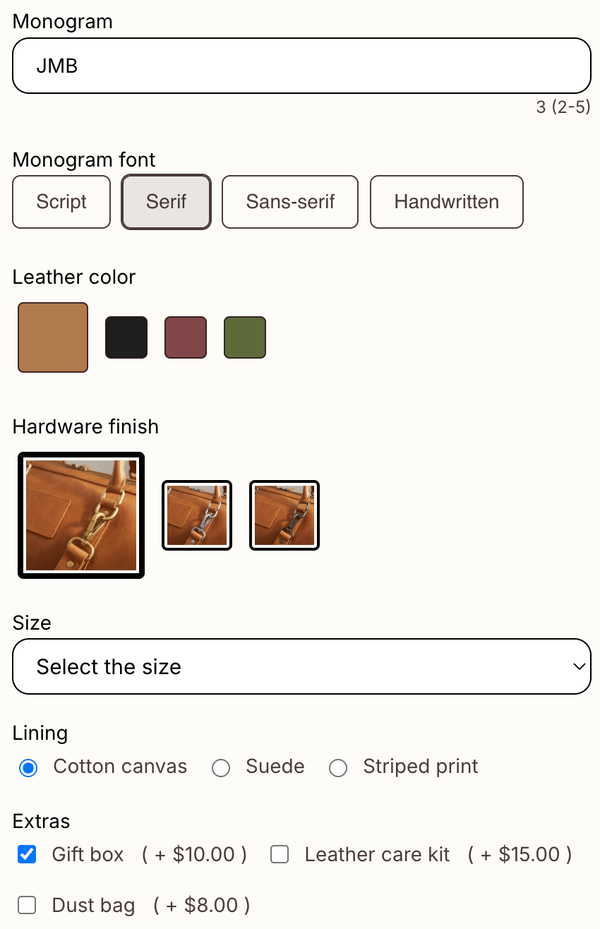
- Field types: textbox, dropdown, radio, checkbox, date picker, file upload, image swatch, font selector, color swatch and number input.
- Live preview: text typed into a textbox and images in an upload field show on the product image before add to cart.
- Uploads (Premium): files up to 200 MB, including PNG, JPEG, PSD and PDF, kept for 3 months.
- Add-on charges (Premium): charge for engraving, a gift box or a rush option as a separate cart line item.
- Conditional logic (Basic and up): show the engraving box only when the shopper ticks “Add engraving”.
- Plans: Basic $5.99/month for unlimited fields; Premium $9.99/month adds uploads, image swatches, add-on charges and variant-level fields.
We build Shopify apps for a living, so we price on features, not on how many orders you take: a store doing 300 personalized orders in December pays the same $9.99 as one doing 3. For how the preview looks on a real product, see our post on product preview personalization.
“The app performs well, we are using it to capture names to be written on custom hoodies.”
SUMMITSPORT, Australia, May 28, 2025, Shopify App Store review
Where do the customer’s choices end up?
Every field value lands on the cart line and then on the order, so production reads it in one place. Text shows as plain text, choices as their label, and uploads as a link to the original file.
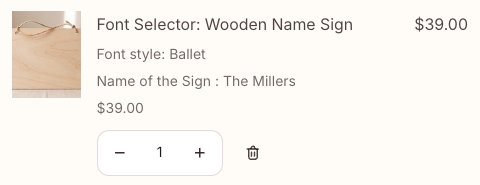
You and your staff see the same values in the Shopify order details. If you charge for personalization, the fee arrives as its own line; our guide to charging for personalization walks through the setup.
How to choose
Use these checks to decide whether an Inkybay alternative fits your store at all.
- Your printer needs a finished PDF or SVG of the design: stay on Inkybay.
- Customers design across 3 or more print sides: Inkybay Advance ($49.99/month) or higher.
- Customers type text, pick options or upload a file: Mini:Custom Fields Personalize, from $5.99/month.
- You sell more than 10 custom products or take more than 30 custom orders a month: compare Inkybay Advance at $49.99 with Premium at $9.99.
- You want to charge for engraving or gift wrap: Mini:Custom Fields Personalize Premium add-on charges.
For a wider look at designer-style apps, see our list of the best Shopify product customizer apps.
Our honest take
I think caps on custom orders are the wrong thing to charge for in personalization. A store’s busiest month, December, is the one where a 30-order cap bites. That is the main reason we would pick a field-based Inkybay alternative for a name, monogram or photo product. The caveat is real, though: Mini:Custom Fields Personalize has no design canvas, no print sides and no print-ready file output. If your printer needs a finished vector file, our app collects the input and someone on your team still has to make the file.
FAQ
What is the best Inkybay alternative for Shopify?
For text, options, uploads and add-on charges, Mini:Custom Fields Personalize at $5.99 or $9.99/month, with no product or order caps on Premium. If your printer needs print-ready files from a design canvas, compare Inkybay’s plans by your product and order count instead.
How much does Inkybay cost?
Inkybay’s plans are Starter $19.99 (10 custom products, 30 custom orders a month), Advance $49.99 (100 and 200), Professional $99.99 (2,000) and Unlimited $249.99 per month, each with a 21-day free trial, according to its App Store listing as of November 2026.
What happens when I outgrow Inkybay’s Starter plan?
Starter covers 10 custom products and 30 custom orders a month. The next plan, Advance, is $49.99/month for 100 products and 200 orders, according to Inkybay’s listing as of November 2026. Inkybay has no free plan; Mini:Custom Fields Personalize has a free plan with 1 field and a 7-day trial on its paid plans.
Is there an Inkybay alternative without product or order limits?
Yes. Mini:Custom Fields Personalize does not price by product count or order count. Basic is $5.99/month and Premium is $9.99/month whether you personalize 5 products or 500.
Can I get print-ready files without Inkybay?
Not from Mini:Custom Fields Personalize. It saves the customer’s text, choices and uploaded files on the order, and your team builds the print file from them. If you need the app to output a finished PDF or SVG, use a designer app.
Can customers upload their own artwork without Inkybay?
Yes. The upload field on Mini:Custom Fields Personalize Premium accepts files up to 200 MB, including PNG, JPEG, PSD and PDF. The file arrives as a link on the order and is kept for 3 months, so download it before then.
Does Mini:Custom Fields Personalize work for apparel and embroidery?
Yes, for collecting what the embroiderer needs: a textbox for the name, a color swatch for thread color and an upload field for a logo. If you charge for embroidery, Premium adds the fee as a separate cart line item, which a customer can remove in the cart while keeping the product.
How do I switch from Inkybay to a field-based app?
List the products that use Inkybay, rebuild each input as a field (name, font, color, upload), and place a test order to check the values on the order. Download any design files you still need from open orders before you uninstall Inkybay, because files are hosted by the app that collected them.