

Shopify allows 3 options per product (for example Size, Color and Material), even though a product can now hold up to 2,048 variants. To give a product on Shopify more than 3 options, add the extra choices as custom fields, split the product, or group products with Combined Listings on Shopify Plus. Custom fields are the fastest route, with one catch: their choices have no stock count or SKU of their own.
Disclosure: we build Mini:Custom Fields Personalize, the app in the steps below, so the caveats here come from setting up 4th and 5th options for merchants, not from a feature list.
In this post:
- What the 3-option limit is in 2026
- Why 2,048 variants does not solve it
- Variants, custom field, or separate products: a decision table
- How to add a 4th option with custom fields
- How to choose
- FAQ
Is Shopify still limited to 3 options per product in 2026?
Yes. Shopify’s Help Center still says each product can have up to 3 options, and it lists no plan that gets more, Shopify Plus included (Shopify Help Center, adding variants, checked November 2026).
In May 2026 a Shopify staff member confirmed on the Shopify developer forum that products are capped at 3 options, with nothing to share about raising it.
We build Shopify apps for a living, so we see this question arrive the same way every time: a merchant has used Size, Color and Material, and the fourth choice (a lining, a font, a gift box) has nowhere to go.
Why doesn’t the 2,048 variant limit help?
Because the wall you hit is the number of options, not the number of variants. Shopify raised the variant cap from 100 to 2,048 for all merchants in October 2025 (Shopify developer changelog), but kept 3 options.
There is a second limit hiding underneath. In themes, Shopify’s Liquid returns at most 250 variants for a product (Shopify dev docs on high-variant products). Themes that expect the full list can misbehave above that.
Here is how fast that bites. Say you sell a leather bag in 4 colors, 3 sizes and 3 hardware finishes: 36 variants, fine. Now you want 3 linings and 4 monogram fonts. If Shopify allowed 5 options, that would be 432 variants, more than the 250 your theme’s Liquid can read, each needing a SKU, a price and a stock count, for choices you do not stock at all. That is the typical shape of a Shopify more than 3 options problem: the extra choices are made to order, so they never needed to be variants.
Which route to Shopify more than 3 options fits your product?
The right route to Shopify more than 3 options depends on one question: does the extra choice change what you stock? This table sets native variants beside the 4 routes past the limit:
| Route | Own stock and SKU | Own price | Plan needed | Best for |
|---|---|---|---|---|
| Native variants (up to 3 options) | Yes | Yes | Any | Choices you stock: size, color |
| Custom field as 4th option | No | Add-on line | Any, plus an app | Made-to-order: lining, font, gift box |
| Separate products | Yes | Yes | Any | A choice that changes the whole item |
| Combined Listings | Yes | Yes | Plus or enterprise | Big catalogs grouped by color or material |
| Line item properties in theme code | No | No | Any, plus a developer | One simple text box |
Combined Listings is Shopify’s own free app. It groups separate products into one listing, which can add up to 3 options on top of each product’s own 3. Its App Store listing says Plus and enterprise plans only (as of November 2026).
Our opinion: most stores that hit the limit do not need a 4th variant option at all. They need fewer variants, with the made-to-order choices moved out of the variant grid. If a choice changes which item leaves the shelf, keep it a variant. If it changes what you make or pack, it is a field.
Our own App Store data says merchants rarely describe the problem in option terms. In the last 90 days (August 24 to November 21, 2026), nobody reached our listing by searching for “shopify more than 3 options”, and App Store searches containing “option” brought Mini:Custom Fields Personalize 4 installs, against 9 for the single word “personalization”. People search for the job, not for the limit.
How do you give a product on Shopify more than 3 options with custom fields?
Keep your stocked choices as Shopify variants and add every other choice as a field on the product page. With Mini:Custom Fields Personalize (Built for Shopify, 4.9 from 146 reviews) it takes 7 steps and no theme code:
- Keep the 3 options you stock as native variants, for example Color, Size and Hardware.
- Install the app and turn on its app embed in the theme editor.
- Create the 4th option as a field. Use a dropdown or radio buttons for a short list, or an image swatch when shoppers choose by look. Label it like a native option, for example “Lining”.
- Add the 5th and 6th choices the same way, such as a monogram textbox that shows the typed text as a live preview on the product image, and a font selector.
- Show fields only when they matter. Conditional logic can hide the font picker until the shopper types a monogram; our Shopify conditional logic guide covers the setup.
- Add a price where a choice costs more, such as a suede lining for +$12. The charge goes into the cart as its own add-on line item.
- Place a test order and check that every choice appears under the product on the order page.
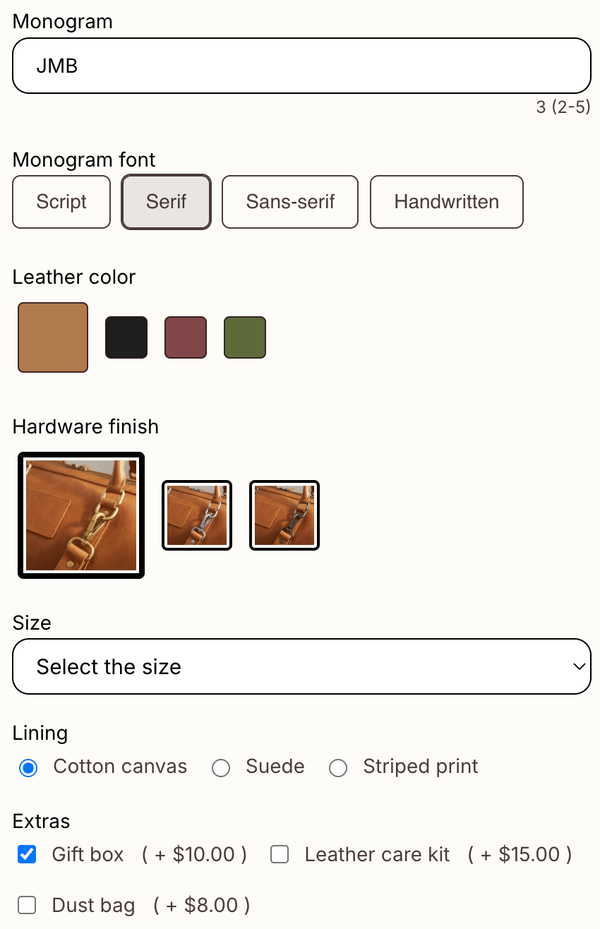
Our demo bag carries 7 choices with no variants at all, the extreme case. In a real store, keep color and size as variants when you stock them separately.
Plans, checked on the App Store listing in November 2026: the Free plan covers 1 field (textbox, checkbox, radio or dropdown), so a single extra dropdown costs nothing. Basic ($5.99/month or $47.90/year) adds unlimited fields and conditional logic. Premium ($9.99/month or $95.90/year) adds image swatches, add-on charges and variant-level fields, so a 4th option such as “Lining” appears only on the variants that offer it (our post on Shopify custom variants explains the setup).
“Such an easy app with so many variations possible.”
EmJay Creations, United Kingdom, July 8, 2025 (Shopify App Store review)
Our guide on how to add custom options on Shopify covers each field type, and Shopify product add-ons covers paid extras.
How to choose: who this is for and who it is not
- Use custom fields if the 4th choice is made to order, personalized or an optional extra.
- Use separate products if the choice deserves its own photos, reviews and URL.
- Use Combined Listings if you are on Plus and have hundreds of products that differ by color or material.
- Do not use custom fields if each value needs its own stock count or barcode. Only variants track that.
- Need a visual builder with layers? See our Shopify product configurator guide.
The honest limit of custom fields for Shopify more than 3 options is inventory. A field choice is saved as text on the order, so a “Suede” lining is not counted down, has no SKU and is missing from stock reports. If you run out of suede, you hide that choice yourself. And because add-on charges are a separate cart line, a shopper can remove that line in the cart and keep the product, so check paid choices before you make the item.
FAQ
How many options can a Shopify product have?
Up to 3 options and 2,048 variants per product, according to Shopify’s Help Center in November 2026.
Does Shopify Plus allow more than 3 options?
Not per product. Plus stores can group products with Shopify’s Combined Listings app, which adds up to 3 listing options on top.
Is there a way to get Shopify more than 3 options without an app?
Yes: split the product, or have a developer add line item properties to the theme. Those have no price or inventory of their own.
Do custom field choices track inventory?
No. A field choice is saved as a line item property, without its own SKU or stock count. Keep anything you stock as a variant.
Can a 4th option change the price?
Yes, with an app that supports add-on pricing. In Mini:Custom Fields Personalize this is a Premium feature ($9.99/month), and the charge appears as a separate line item in the cart.
Will Shopify raise the 3-option limit?
Nothing is announced. In May 2026 Shopify staff said there was nothing to share and that any change would appear in Shopify’s changelog.
Why does my product with 300 variants not show every combination?
Shopify’s Liquid returns at most 250 variants per product, so themes that rely on the full list can miss some.