

Charge for personalization on Shopify means attaching an add-on price to a specific field option, like a checkbox for “add engraving, +$5,” so the charge shows up alongside the personalized product. Mini:Custom Fields Personalize supports this on the Premium plan, $9.99/month or $95.90/year, by adding the add-on as its own line item next to the main product, not a theme hack. This post covers the setup, plus a real limit worth knowing before you rely on it for revenue protection.
In this post:
- What charging for personalization actually requires
- Step-by-step: adding an add-on price
- How the add-on charge actually gets added to the cart
- Which plan you need
- A real limit worth stating
- If you use another bundling app
- FAQ
What “Charge for Personalization” Actually Requires on Shopify
Shopify has no native way to charge for personalization out of the box, a text field or engraving option has no price attached unless an app adds one. To charge for personalization on Shopify, you need two things: a custom field the customer interacts with, and an add-on price rule attached to a specific option within that field, not the field itself. That distinction matters because it lets you charge for engraving but not for a plain gift note on the same product.
Most merchants who want to charge for personalization are really asking for one of two setups: a flat fee added whenever any personalization is used, or a variable fee tied to specific options, like $3 for a single initial and $8 for a full name. Mini:Custom Fields Personalize supports both through the same add-on pricing mechanism.
Step-by-Step: Adding an Add-On Price to a Custom Field
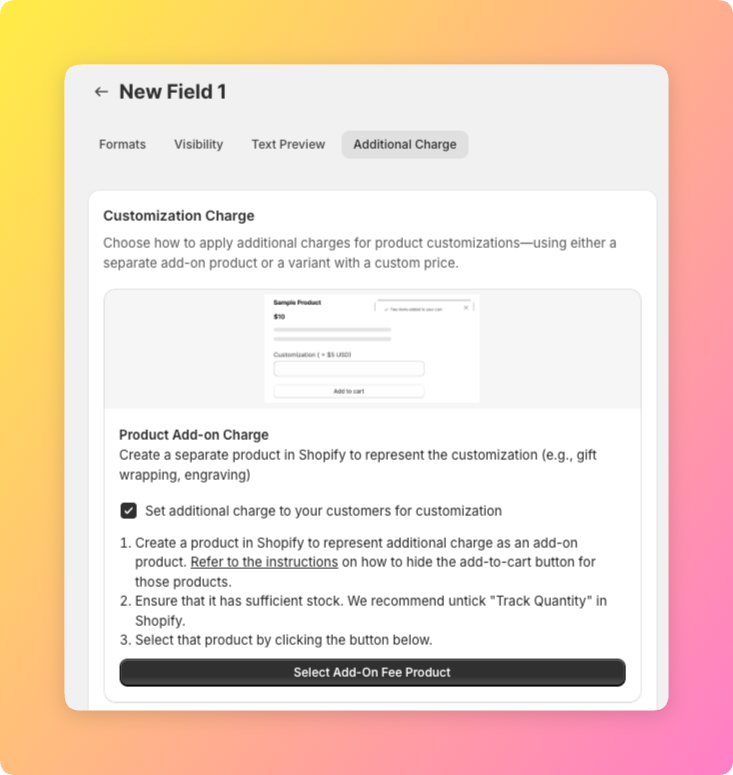
First, create or open the field you want to charge for, a checkbox, radio button, or dropdown option all support add-on pricing. Second, open that option’s settings and enter the add-on amount, this is a flat dollar figure per option, not a percentage. Third, decide whether the option is required or optional; most personalization add-ons should stay optional so customers who don’t want the upsell aren’t blocked at checkout.
Fourth, save and test on the storefront. The add-on price appears next to the option label automatically, and once selected, it shows as a separate line in the cart, not folded silently into the base product price. That visibility is deliberate, hidden pricing changes are the fastest way to generate a chargeback dispute.
How the Add-On Charge Actually Gets Added to the Cart
Mini:Custom Fields Personalize doesn’t use Shopify’s Cart Transform API for add-on pricing. Instead, when a customer selects a priced personalization option, the app adds the charge as its own separate line item in the cart, right alongside the main product, rather than editing the product’s price directly. The customer sees two lines at checkout: the base product, and the add-on charge with its own label and price.
That’s a simpler mechanism than a Cart Transform bundle, and it’s also why add-on pricing on Custom Fields Personalize doesn’t compete for the single Cart Transform function slot Shopify allows per cart. It runs as a standard second line item, not a function fighting another app for that one slot.
Which Plan You Need
Here’s the plan breakdown if your only reason to upgrade is to charge for personalization:
| Plan | Price | Add-on pricing included? |
|---|---|---|
| Free | $0 | No, 1 field total and no add-on pricing |
| Basic | $5.99/month | No, unlimited fields but still no add-on charges |
| Premium | $9.99/month or $95.90/year | Yes, added as a separate line item alongside the main product |
If personalization itself is free and you only want to charge for specific upgrades, like engraving or gift wrap, Premium is the tier that unlocks it, Basic covers unlimited free fields but stops short of add-on pricing entirely.
A Real Limit Worth Stating: The Add-On Line Item Can Still Be Removed Separately
We built the add-on pricing feature ourselves, so we know exactly where the rough edges are, including this one: because the add-on charge is its own line item rather than folded into the main product’s price, a customer can currently remove just the add-on line from their cart or checkout while keeping the personalized product itself. It’s a known, open item on our own roadmap to lock the two together, not a hidden bug we’re pretending doesn’t exist.
What that means practically: if you charge for personalization purely to cover the extra labor cost of engraving, don’t treat the add-on charge as a guaranteed revenue floor yet. It works correctly in the overwhelming majority of checkouts, but a customer who deliberately edits their cart can currently strip the add-on line while keeping the personalized item in the order.
If You Use Another Bundling App: What to Check
Because Custom Fields Personalize’s add-on pricing doesn’t use Shopify’s Cart Transform API, it doesn’t compete for the single Cart Transform function slot Shopify allows per cart, so it doesn’t conflict with bundling apps that do use Cart Transform, like Shopify Bundles, the way some other cart-modifying features can.
That said, the add-on still exists as its own separate line item, the same setup behind the removability limit above. If you also run a bundling app, it’s worth checking your personalization fields on the storefront and in cart or checkout after installing or updating either app, mainly to confirm the add-on line item still displays and totals correctly alongside whatever the bundling app is doing to the cart, rather than assuming the two will always coexist cleanly.
Shopify’s own Cart API documentation is a useful reference if you want to see how line items work at a technical level. It’s also worth reading our guide on Shopify product add-ons for the broader add-on pricing picture, and how to add custom fields to product pages if you’re starting from scratch.
Frequently Asked Questions
- 1. Can I charge extra for personalization on Shopify without hiring a developer?
- Yes, apps like Mini:Custom Fields Personalize add this through the app’s own settings, no custom code required.
- 2. Does charging extra for personalization use Shopify’s Cart Transform API?
- No. Custom Fields Personalize adds the add-on charge as its own separate line item in the cart alongside the main product, rather than using Cart Transform to modify the product’s price directly.
- 3. Can a customer remove the personalization charge after adding it to their cart?
- Currently, yes, since the add-on is its own line item, a customer can remove just that line while keeping the personalized product. It’s a known, open limitation we’re working on.
- 4. Is charging for personalization available on Custom Fields Personalize’s free plan?
- No, add-on pricing is a Premium-tier feature ($9.99/month or $95.90/year). The Free and Basic plans support custom fields but not add-on charges.
- 5. Can I set different add-on prices for different personalization options?
- Yes, each option, a checkbox, radio choice, or dropdown item, can carry its own add-on price, so engraving and gift wrap can be priced separately on the same field.
- 6. Does the add-on charge work alongside other bundling or discount apps?
- Yes, since it doesn’t use Cart Transform, it doesn’t compete with bundling apps for Shopify’s single Cart Transform slot. It’s still worth checking your fields after installing a bundling app, since the add-on is its own line item that could interact with how the bundling app changes the cart.



