

A shopify waiting list lets shoppers sign up on a sold-out product page and get notified automatically the moment it’s back, and with Restock Alert & Waitlist ‑ Mini it takes about 10 minutes to set up with no developer needed. It’s not quite the same as a plain “notify me” button either, since a real waiting list queues actual signups you can see, export, and act on.
Disclosure: we build Restock Alert & Waitlist ‑ Mini, the app this post describes, so the setup steps below come from supporting merchants who run waiting lists every day, not from a generic feature list.
In this post:
- What a shopify waiting list actually does
- Setting up a shopify waiting list, step by step
- Customizing the signup form and restock email
- Exporting your list or connecting it to Shopify Flow
- Waiting list vs. pre-order vs. backorder
- FAQ
What a Shopify Waiting List Actually Does
Our own published guide on Shopify waitlists is already one of our best-performing posts by clicks, which tells us a plain shopify waiting list is something merchants are actively searching for and not finding enough direct answers to. This post goes narrower on the exact setup.
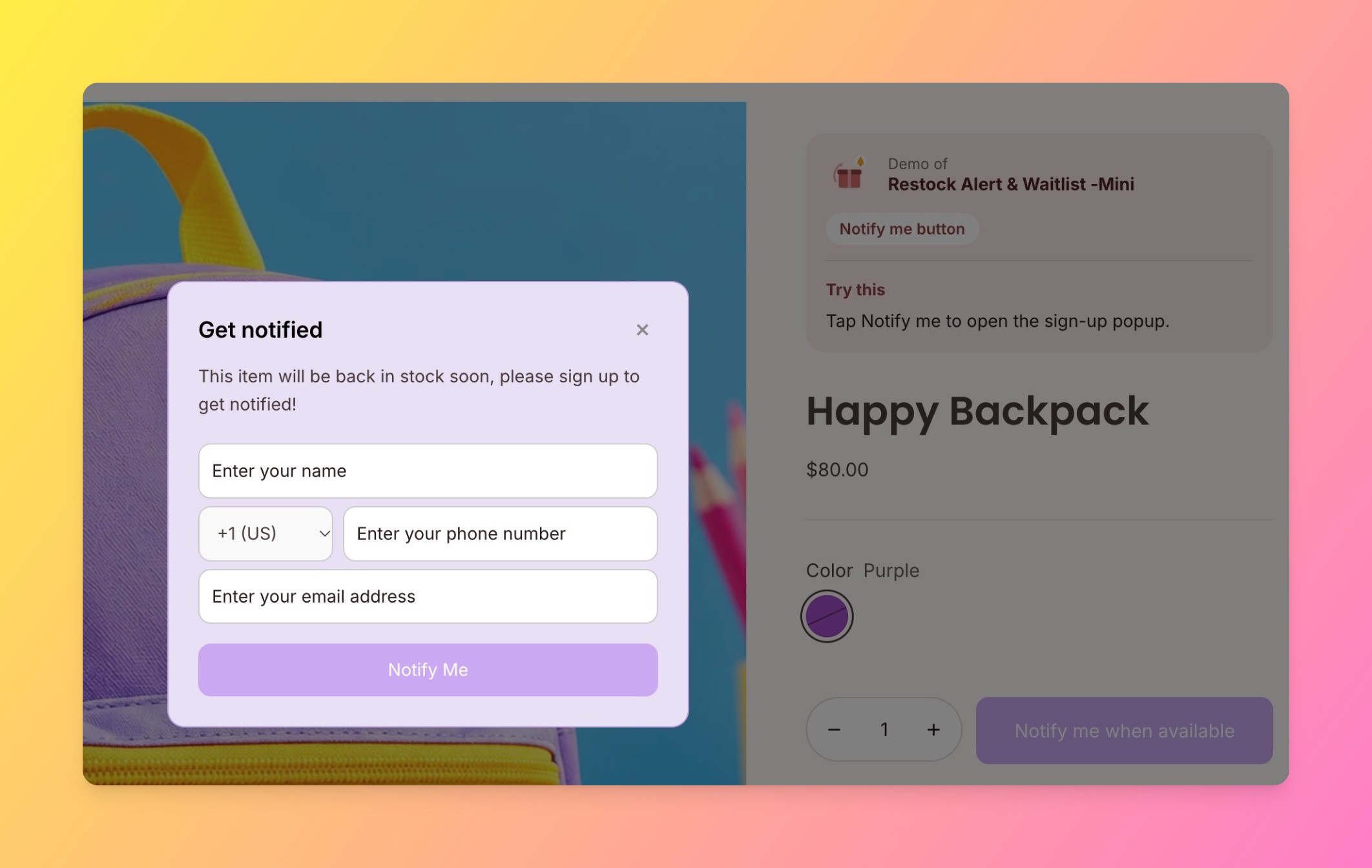
A “notify me” button and a true waiting list sound like the same thing, but they behave differently once a product sells out often. A notify-me button just fires an email when inventory moves above zero. A shopify waiting list keeps a running, exportable record of everyone who signed up, which matters the moment you want to email that group directly, filter it by variant, or route it into a workflow in Shopify Flow.
Why does that distinction matter so much? Because a sold-out product isn’t a dead end, it’s a list of warm leads who already decided to buy. Losing that list the moment the email goes out is losing the one piece of data that tells you exactly how much demand you missed.
Say a small workshop-style store has 20 seats per class and sells out three days before each session. Without a waiting list, the merchant has no record of who wanted in once seats ran out. With one, every missed signup becomes next month’s first 20 sales.
Setting Up a Shopify Waiting List, Step by Step
Here’s the actual workflow with Restock Alert & Waitlist ‑ Mini:
- Install the app. Search the Shopify App Store for Restock Alert & Waitlist ‑ Mini and click Add app.
- Turn on the waiting list widget. Enable it from the app dashboard so it appears automatically on any sold-out product.
- Confirm your out-of-stock settings. The widget only shows once a product’s inventory hits zero and “Continue selling when out of stock” is off.
- Set your restock trigger. Choose whether the notification email fires the moment stock is added or only above a chosen quantity.
- Preview and test. Sign yourself up on a test product and confirm the email actually arrives when you add stock back.
“This is the perfect app for a small store like ours that gives workshops with limited numbers of spaces available. We can keep track of who is on the waitlist for a specific workshop and then let the waitlist participants know if there is a cancellation they can fill.”
Mountain Intaglio, United States. Restock Alert & Waitlist ‑ Mini on the Shopify App Store
Customizing the Signup Form and Restock Email
The default widget works out of the box, but two tweaks make a real difference. First, swap the generic “Notify me” label for something specific, like “Join the waiting list”, since that framing alone tends to set clearer expectations about what happens next. Second, customize the restock email itself with a clear subject line and a direct link back to the product, rather than relying on the app’s default copy.
We see this come up constantly: merchants who personalize the waiting list copy get noticeably higher click-through on the restock email than stores running the stock default. We don’t have a universal percentage to quote here, it varies too much by niche, but the pattern holds across the stores we support.
Exporting Your List or Connecting It to Shopify Flow
A shopify waiting list is only as useful as what you can do with it after signups start coming in. Restock Alert & Waitlist ‑ Mini lets you export the full list as a CSV, so you can segment it, import it elsewhere, or just keep a backup. For stores on Shopify Plus or with Flow access, you can also trigger a workflow the moment someone joins, tagging the customer, adding them to a specific email list, or alerting your team in Slack.
Waiting List vs. Pre-Order vs. Backorder
These three get lumped together constantly, but they solve different problems. Here’s the quick breakdown before you decide which one fits your store:
| Approach | What happens at checkout | Best for |
|---|---|---|
| Waiting list | No purchase yet, customer just signs up to be notified | Products with no restock date confirmed |
| Pre-order | Customer pays now, item ships later | A confirmed restock or launch date |
| Backorder | Customer pays now, fulfillment is delayed | Short, predictable delays on an existing SKU |
If you’re not sure your out-of-stock settings are configured correctly for any of these, Shopify’s own documentation on selling products when out of stock is worth a quick check first.
We’d push back on defaulting to pre-order just because it captures the sale sooner. Charging a customer before you have a firm restock date risks a refund request if the timeline slips, and that’s a worse outcome than a clean waiting list signup with no money changed hands yet.
Honest trade-off worth naming: a waiting list converts to a sale only once stock actually arrives, not at signup, so it trades a slightly lower immediate conversion number for a much lower refund and complaint rate than pre-order.
If you’re building out the rest of your back-in-stock setup, our guide on collecting emails for back in stock products covers the broader email-capture side, and how to create a waitlist on Shopify walks through the original setup this post extends.
A shopify waiting list turns a sold-out page from a dead end into a list of customers who already decided to buy. Setting one up with Restock Alert & Waitlist ‑ Mini takes about 10 minutes, and the export and Flow options mean that list keeps working for you well after the restock email goes out.
Frequently Asked Questions
How do I create a shopify waiting list?
Install an app like Restock Alert & Waitlist ‑ Mini, turn on the waiting list widget, confirm your out-of-stock inventory settings, and set a restock trigger. The widget then appears automatically on sold-out products.
Is a waiting list the same as a “notify me” button?
Not quite. A notify-me button just sends an email when stock returns, while a true waiting list keeps an exportable record of everyone who signed up, which you can segment, export, or route into Shopify Flow.
Can customers join a waiting list for a specific size or variant?
Yes, most waitlist apps track signups at the variant level, so a customer who wants a specific size or color only gets notified when that exact variant is restocked.
How many people can join a Shopify waiting list?
There’s no practical limit from the app side. The list grows with every signup until the product is restocked and the notification email goes out.
Does a waiting list cost extra on Shopify?
Waiting list functionality comes from a third-party app rather than Shopify itself, and pricing varies by app. Restock Alert & Waitlist ‑ Mini offers a free plan for a single product, with paid plans for unlimited products and extra features.
Can I export my Shopify waiting list?
Yes, Restock Alert & Waitlist ‑ Mini lets you export the full signup list as a CSV, so you can segment it, back it up, or import it into another tool.